
Address Bar Search Options Chrome 插件, crx 扩展下载
Address Bar Search Options
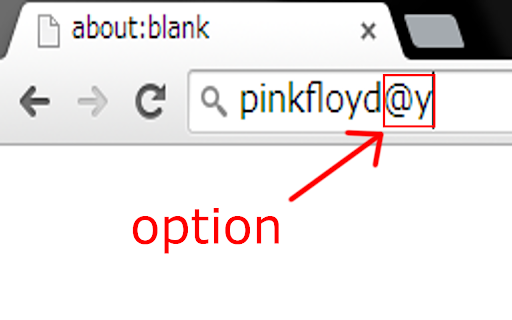
===== e.g =====
Keyword: pinkfloyd
option : @y
Simply type pinkfloyd@y in address bar.
ENTER-Key
v2.2 bugfix(options page)
v2.1 added options page
===== Options =====
@y = past year
@m = past month
@w = past week
@d = past 24 hours
@h = past hour
@i = images
@v = videos
@yt = youtube
@2y = past 2years...
@5y = past 5years
@2m = past 2 months...
@11m = past 11 months
@2w = past 2 weeks
@3w = past 3 weeks
@2d = past 2 days...
@6d = past 6 days
@2h = past 2 hours...
@23h = past 23 hours
| 分类 | 📝工作流程与规划 |
| 插件标识 | dgibfaacpcgapbgbopdcoaimigodiccn |
| 平台 | Chrome |
| 评分 |
☆☆☆☆☆
|
| 评分人数 | |
| 插件主页 | https://chromewebstore.google.com/detail/address-bar-search-option/dgibfaacpcgapbgbopdcoaimigodiccn |
| 版本号 | 25.2.3.0 |
| 大小 | 16.15KiB |
| 官网下载次数 | 36 |
| 下载地址 | |
| 更新时间 | 2015-04-30 00:00:00 |
CRX扩展文件安装方法
第1步: 打开Chrome浏览器的扩展程序
第2步:
在地址栏输入: chrome://extensions/
第3步: 开启右上角的【开发者模式】
第4步: 重启Chrome浏览器 (重要操作)
第5步: 重新打开扩展程序管理界面
第6步: 将下载的crx文件直接拖入页面完成安装
注意:请确保使用最新版本的Chrome浏览器