
Extract Data Chrome 插件, crx 扩展下载
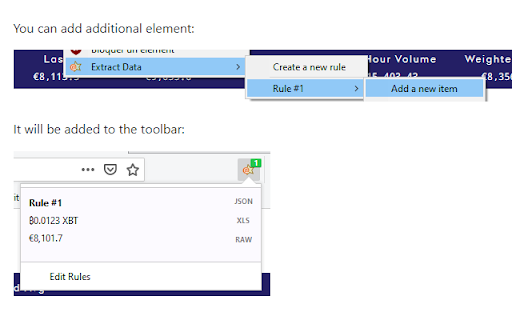
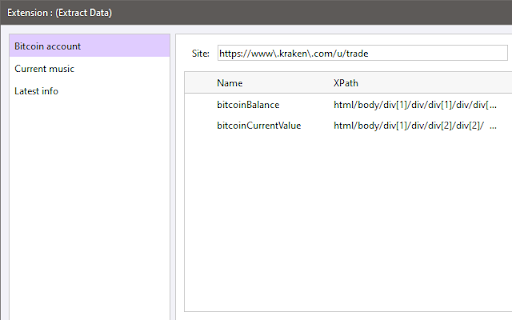
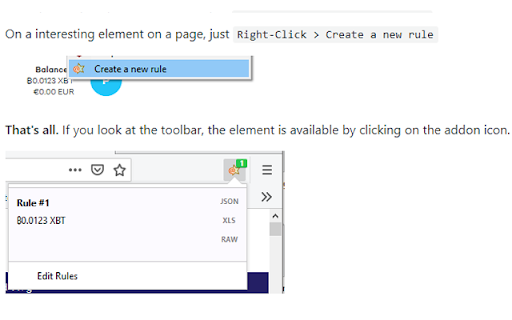
Extract data on opened tabs and copy it to clipboard. (as JSON, XLS or with textual format)
This extension allows to extract data on opened tabs and copy it to clipboard. (as JSON, XLS or with textual format)
Just right click on an interesting element in a page. (for instance, a bank account balance, current played music) and click on the addon added menu.
Each time you will visit the site again, the data will be automatically extracted and available on the browser toolbar, directly accessible for a copy to the clipboard.
- You can also create compound data, for instance by selecting several accounts visible in the same page, then by only one click on the toolbar, you will copy all item in once click.
- By using regular expression you can retrieve a data from many pages on the same site
An How-To is available on https://github.com/pdulvp/extract-data
| 分类 | 📝工作流程与规划 |
| 插件标识 | dgojclpdbgnpjclhimcldkapkgnmjbcb |
| 平台 | Chrome |
| 评分 |
☆☆☆☆☆
|
| 评分人数 | |
| 插件主页 | https://chromewebstore.google.com/detail/extract-data/dgojclpdbgnpjclhimcldkapkgnmjbcb |
| 版本号 | 1.7.0 |
| 大小 | 72.84KiB |
| 官网下载次数 | 392 |
| 下载地址 | |
| 更新时间 | 2021-04-02 00:00:00 |
CRX扩展文件安装方法
第1步: 打开Chrome浏览器的扩展程序
第2步:
在地址栏输入: chrome://extensions/
第3步: 开启右上角的【开发者模式】
第4步: 重启Chrome浏览器 (重要操作)
第5步: 重新打开扩展程序管理界面
第6步: 将下载的crx文件直接拖入页面完成安装
注意:请确保使用最新版本的Chrome浏览器