
Github Comment Tracker Chrome 插件, crx 扩展下载
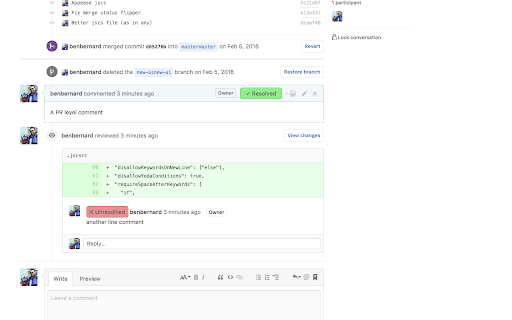
Tracks resolved / unresolved state of comments on github pull requests
Adds 'Resolved' comment tracking to github pull requests. If you mark a comment as resolved, the comment id (and only the id) is stored in a public database hosted on Parse.
If all comments are not resolved, displays a warning next to the merge button.
Repo available here: https://github.com/benbernard/CommentTracker - Issues / pulls / etc welcome
CHANGES:
1.1.11 - Fix for more github changes
1.1.10 - Fix Display of unresolved comments collection
1.1.9 - Fixes for new github dom changes
1.1.8 - Fixes for unresolved comment list
1.1.7 - Various UI improvements from @alexbt a) Put unresolved comments at bottom of PR b) have status on #files tab c) tweaks to options page
1.1.6 - Change backend server
1.1.5 - Fix un-hiding unresolved comments with github codereview changes
1.1.4 - Fix tracking with github code-review changes
1.1.3 - Fix button display (new github changes)
1.1.2 - UI broken with github updated, fixed.
1.1.1 - Fix when also working with Wide Github extension
1.1 - Change styling of controls, Fix bug on applying when navigating from /pulls
1.0.1 - Make polling on PRs configurable
| 分类 | 💻开发者工具 |
| 插件标识 | dkjmlcpmijiiejngafklkleghnaiabpa |
| 平台 | Chrome |
| 评分 |
☆☆☆☆☆
|
| 评分人数 | |
| 插件主页 | https://chromewebstore.google.com/detail/github-comment-tracker/dkjmlcpmijiiejngafklkleghnaiabpa |
| 版本号 | 10.0.14 |
| 大小 | 69.07KiB |
| 官网下载次数 | 1000 |
| 下载地址 | |
| 更新时间 | 2018-08-02 00:00:00 |
CRX扩展文件安装方法
第1步: 打开Chrome浏览器的扩展程序
第2步:
在地址栏输入: chrome://extensions/
第3步: 开启右上角的【开发者模式】
第4步: 重启Chrome浏览器 (重要操作)
第5步: 重新打开扩展程序管理界面
第6步: 将下载的crx文件直接拖入页面完成安装
注意:请确保使用最新版本的Chrome浏览器