
Nepal Foreign Currency Exchange Rate Chrome 插件, crx 扩展下载
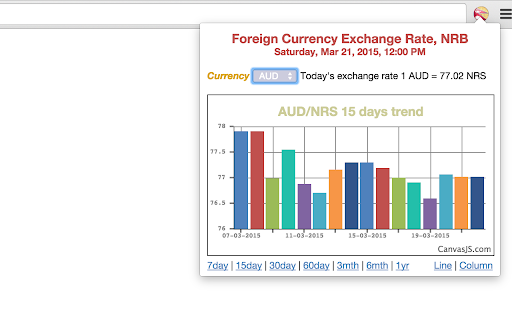
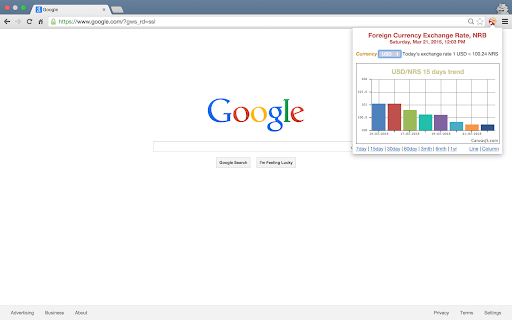
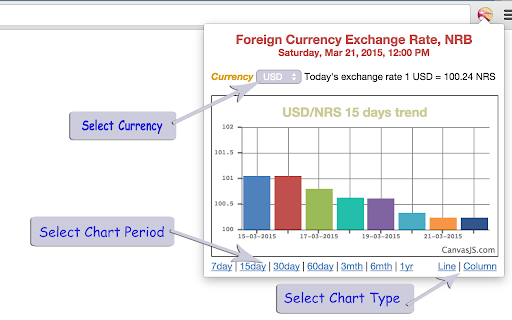
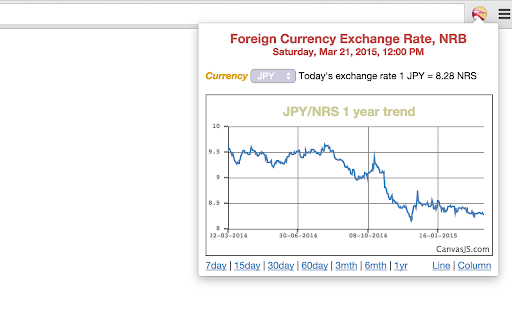
Foreign Currency Exchange Rate - Nepal Rastra Bank.
Simple and light weight Currency Converter plugin to see the actual exchange rate offered by Nepal Rastra Bank between Nepalese currency and major international currencies.
In addition to giving the most current exchange rate, this extension also shows the exchange rate trends in graph. You can choose your currency to convert from and also the period of time, which can be 7 days, 15 days, 30 days, 60 days, 3 months, 6 months and 1 year! These are the major international currencies supported by Nepal Rastra Bank.
U.S. dollar (USD)
European euro (EUR)
UK pound sterling (GBP)
Swiss franc (CHF)
Australian dollar (AUD)
Canadian dollar (CAD)
Singapore dollar (SGD)
Japanese yen (JPY)
Chinese Renminbi (Yuan) (CNY)
Saudi Arabian Riyal (SAR)
Qatari Riyal (QAR)
Thai Baht (THB)
UAE Dirham (AED)
Malaysian Ringgit (MYR)
South Korean Won (KPW)
***********************
Updates in 1.2.0 - Changes to support JSON API of NRB, display full country name with currency.
Updates in 1.1.1 - Changes pertaining to SSL in NRB websites
Updates in 1.1.0 - Product name modification, bug fixes, refractoring, loading sign, data caching for optimization, changes in data format from NRB.
***********************
| 分类 | 📝工作流程与规划 |
| 插件标识 | dndlkmnekcjedolncapefihfnlmopnah |
| 平台 | Chrome |
| 评分 |
☆☆☆☆☆
|
| 评分人数 | |
| 插件主页 | https://chromewebstore.google.com/detail/nepal-foreign-currency-ex/dndlkmnekcjedolncapefihfnlmopnah |
| 版本号 | 25.2.3.0 |
| 大小 | 108KiB |
| 官网下载次数 | 41 |
| 下载地址 | |
| 更新时间 | 2024-11-11 00:00:00 |
CRX扩展文件安装方法
第1步: 打开Chrome浏览器的扩展程序
第2步:
在地址栏输入: chrome://extensions/
第3步: 开启右上角的【开发者模式】
第4步: 重启Chrome浏览器 (重要操作)
第5步: 重新打开扩展程序管理界面
第6步: 将下载的crx文件直接拖入页面完成安装
注意:请确保使用最新版本的Chrome浏览器