
Toktogi: A Korean-English Popup Dictionary Chrome 插件, crx 扩展下载
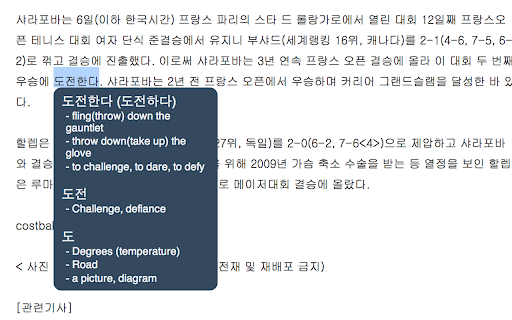
Popup Korean-English dictionary that shows you the definitions of Korean words when you hover the mouse next to them
Toktogi is a popup Korean-English dictionary. Once installed and turned on, simply hover the mouse in front of a Korean word on a page and a box will pop up with the definition in English. This is great for people reading Korean web pages who don't want to have to copy and paste words into a search engine or dictionary to get the definition.
Toktogi uses a dictionary created from the 'kengdic' project, which you can find here: https://github.com/garfieldnate/kengdic
Toktogi is inspired by the Japanese language learning extensions Rikaichan and Rikaikun.
Twitter: https://twitter.com/toktogiapp
Email: [email protected]
Website: http://www.toktogi.com
| 分类 | 📝工作流程与规划 |
| 插件标识 | domfinmkohodhgghgedfdcmonefafolm |
| 平台 | Chrome |
| 评分 |
☆☆☆☆☆
|
| 评分人数 | |
| 插件主页 | https://chromewebstore.google.com/detail/toktogi-a-korean-english/domfinmkohodhgghgedfdcmonefafolm |
| 版本号 | 25.2.3.0 |
| 大小 | 7.19MiB |
| 官网下载次数 | 8000 |
| 下载地址 | |
| 更新时间 | 2021-05-19 00:00:00 |
CRX扩展文件安装方法
第1步: 打开Chrome浏览器的扩展程序
第2步:
在地址栏输入: chrome://extensions/
第3步: 开启右上角的【开发者模式】
第4步: 重启Chrome浏览器 (重要操作)
第5步: 重新打开扩展程序管理界面
第6步: 将下载的crx文件直接拖入页面完成安装
注意:请确保使用最新版本的Chrome浏览器