
Blockade Chrome 插件, crx 扩展下载

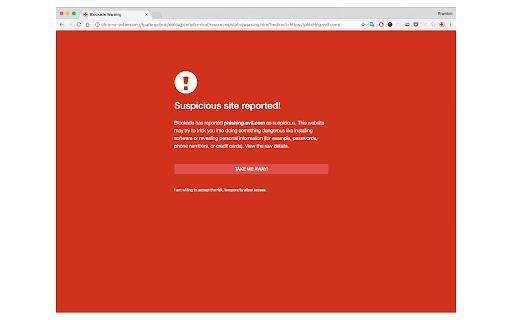
Block malicious websites from being accessed in the browser.
Blockade brings antivirus-like capabilities to users who run the Chrome browser. Built as an extension, Blockade blocks malicious resources from being viewed or loaded inside of the browser. Blockade focuses on those who are often targeted via phishing attacks and may not have a substantial capability at their disposal.
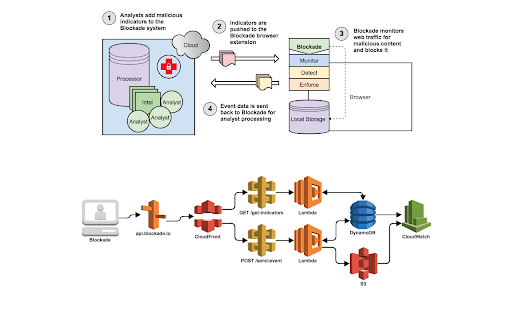
Using threat intelligence mined from multiple sources (and analysts), Blockade attempts to detect attacks that may exist in the browser by monitoring web traffic requests. The primary goal for the project is to detect and prevent as many attacks as possible for those who would otherwise go left unnoticed.
| 分类 | ♿无障碍访问 |
| 插件标识 | dpcbdbpeiafniipmiedlceedbffiejek |
| 平台 | Chrome |
| 评分 |
☆☆☆☆☆
|
| 评分人数 | |
| 插件主页 | https://chromewebstore.google.com/detail/blockade/dpcbdbpeiafniipmiedlceedbffiejek |
| 版本号 | 2.0.4 |
| 大小 | 448KiB |
| 官网下载次数 | 868 |
| 下载地址 | |
| 更新时间 | 2017-11-16 00:00:00 |
CRX扩展文件安装方法
第1步: 打开Chrome浏览器的扩展程序
第2步:
在地址栏输入: chrome://extensions/
第3步: 开启右上角的【开发者模式】
第4步: 重启Chrome浏览器 (重要操作)
第5步: 重新打开扩展程序管理界面
第6步: 将下载的crx文件直接拖入页面完成安装
注意:请确保使用最新版本的Chrome浏览器