
USC course watcher Chrome 插件, crx 扩展下载
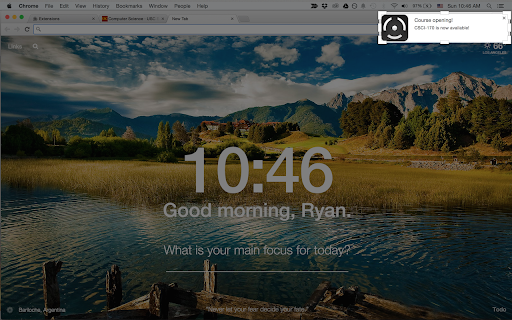
Add an indicator to your chrome and quickly notified when there is opening for your class
Are you wasting your time by constantly checking if a class you want to register is available or not? USC Course Watcher is here to help you! Simply add a real time green/red indicator to your chrome to easily check the class availability without having to manually check it yourself. You will also get a notification just in case you miss the change of indicator status.
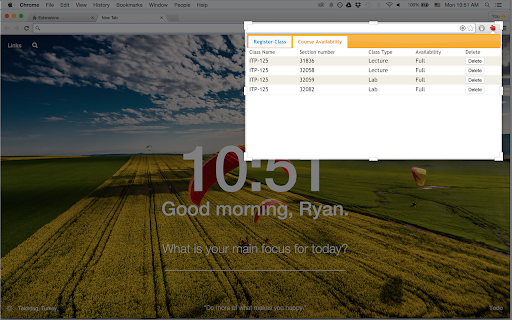
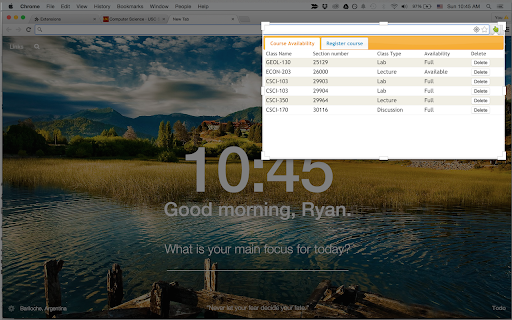
Watch you class easily by selecting the department name and providing the section number for the class. If at least one of the classes you registered to USC Course Watcher is available, it will send you a notification instantly. Are you worried that you might miss the notification form us? Don't worry! The icon image of this extension is a red/green indicator showing the real time status of your watched courses to make it easy to manually check the status. If the icon image is green, it means at least one of your watched courses has opening, and all you have to do is register this class using USC registration system!
USC Course Watcher automatically scrapes and sync data from classes.usc.edu regularly every 15 seconds. So all you have to do is select the class you want to register and do whatever you want to do on chrome.
Tips:
-If your wifi connection is week or slow, please patiently wait until your watched course list show up.
-You can delete your watched list by clicking the "Delete" button next to the each class list.
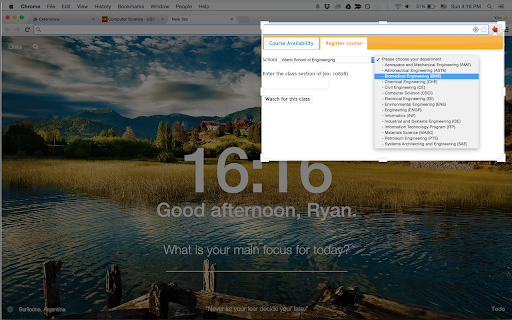
-After installing this extension, go to the "Register course" section to add a class to the watched list.
-After selecting department using the drop down menu, provide the section number for the class.
-You can find the section id for your class by clicking "Click here to find section id" in the "Register course" tab. It will redirect you to the USC Class of Schedule website where you can easily identify the course section number.
Warning:
Apparently, the official USC Class of Schedule website is not updated instantly as the USC registration system. Since all the data of this extension is scraped from the USC Class of Schedule website, it won't be able to tell you about class opening until the USC Class of Schedule website is updated.
Something went wrong? Have you found some bugs? I would be happy to hear about it. Email me at [email protected] to contact me!
| 分类 | 📝工作流程与规划 |
| 插件标识 | dpkcmpfeohfppbgflelbkemojphgjdhf |
| 平台 | Chrome |
| 评分 |
☆☆☆☆☆
|
| 评分人数 | |
| 插件主页 | https://chromewebstore.google.com/detail/usc-course-watcher/dpkcmpfeohfppbgflelbkemojphgjdhf |
| 版本号 | 25.2.3.0 |
| 大小 | 1.87MiB |
| 官网下载次数 | 668 |
| 下载地址 | |
| 更新时间 | 2015-07-13 00:00:00 |
CRX扩展文件安装方法
第1步: 打开Chrome浏览器的扩展程序
第2步:
在地址栏输入: chrome://extensions/
第3步: 开启右上角的【开发者模式】
第4步: 重启Chrome浏览器 (重要操作)
第5步: 重新打开扩展程序管理界面
第6步: 将下载的crx文件直接拖入页面完成安装
注意:请确保使用最新版本的Chrome浏览器