
URL Aliaser Chrome 插件, crx 扩展下载
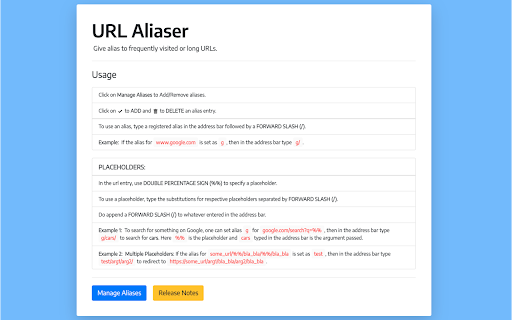
Give alias to frequently visited URLs.
Bored of typing those long URLs again and again? Get rid of it with this extension. It enables a user to add aliases (or URL shortcuts) for frequently visited website URLs, thus saving time!
- Add multiple placeholders for easier navigation.
- Sync with Google Account to access on all signed in devices.
Click on 'Add to Chrome' above. Navigate to 'Options' after clicking the URL Aliaser icon right near the address bar for the usage instructions and managing aliases.
| 分类 | ♿无障碍访问 |
| 插件标识 | dpmjkbfpciagadmabadpflnhlkhcaaii |
| 平台 | Chrome |
| 评分 |
☆☆☆☆☆
|
| 评分人数 | |
| 插件主页 | https://chromewebstore.google.com/detail/url-aliaser/dpmjkbfpciagadmabadpflnhlkhcaaii |
| 版本号 | 2.19.1 |
| 大小 | 1.27MiB |
| 官网下载次数 | 58 |
| 下载地址 | |
| 更新时间 | 2021-04-01 00:00:00 |
CRX扩展文件安装方法
第1步: 打开Chrome浏览器的扩展程序
第2步:
在地址栏输入: chrome://extensions/
第3步: 开启右上角的【开发者模式】
第4步: 重启Chrome浏览器 (重要操作)
第5步: 重新打开扩展程序管理界面
第6步: 将下载的crx文件直接拖入页面完成安装
注意:请确保使用最新版本的Chrome浏览器