
Humanize Blogger Editor Chrome 插件, crx 扩展下载
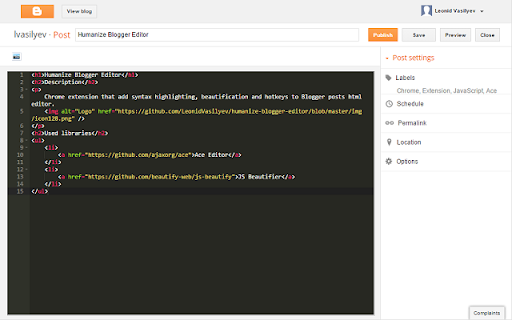
Add syntax highlighting, beautification and hotkeys to Blogger posts html editor.
This extension is for those who:
a. loves Blogger platform
b. prefers write posts in html
c. doesn't feel fulfilled with an original Blogger html editor
There are html syntax highlight, html beautification and following hotkeys in the first version:
Beautify html: Ctrl-B
Insert image: Ctrl-I
Publish/Update: Ctrl-J
Save/Revert to draft: Ctrl-K
Preview: Ctrl-L
Close: Ctrl-Q
The only English interface is supported. There will be support for theme switch and Mac in future versions.
OR maybe something even more mind blowing than Mac support.
| 分类 | 📝工作流程与规划 |
| 插件标识 | eajgmklihlmnnlpejikagagfndcekdei |
| 平台 | Chrome |
| 评分 |
☆☆☆☆☆
|
| 评分人数 | |
| 插件主页 | https://chromewebstore.google.com/detail/humanize-blogger-editor/eajgmklihlmnnlpejikagagfndcekdei |
| 版本号 | 7.5.2 |
| 大小 | 183KiB |
| 官网下载次数 | 157 |
| 下载地址 | |
| 更新时间 | 2015-02-07 00:00:00 |
CRX扩展文件安装方法
第1步: 打开Chrome浏览器的扩展程序
第2步:
在地址栏输入: chrome://extensions/
第3步: 开启右上角的【开发者模式】
第4步: 重启Chrome浏览器 (重要操作)
第5步: 重新打开扩展程序管理界面
第6步: 将下载的crx文件直接拖入页面完成安装
注意:请确保使用最新版本的Chrome浏览器