
Monokai for Chrome Chrome 插件, crx 扩展下载
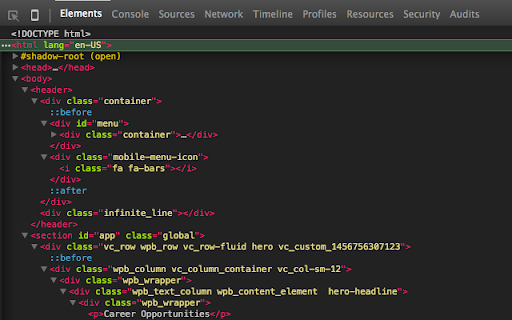
Monokai color scheme for Chrome dev tools.
** Update **
Latest version of Chrome creates small breaks to the theme. This can be fixed by enabling 'Dark' mode. To enable, go to Developer Tools -> Settings, Under Appearance, Theme: Dark.
**
Requirements:
1. Navigate to ' chrome://flags/ ' and Enable 'Developer Tools experiments'
2. Dev Tools Settings -> Experiments -> Allow custom UI themes
3. Restart, Done!
Monokai color scheme for Chrome dev tools. Its open source, check out the 'Website' for the Github link.
| 分类 | 📝工作流程与规划 |
| 插件标识 | ebanajomahnlhgbljngocmccmpelnaam |
| 平台 | Chrome |
| 评分 |
☆☆☆☆☆
|
| 评分人数 | |
| 插件主页 | https://chromewebstore.google.com/detail/monokai-for-chrome/ebanajomahnlhgbljngocmccmpelnaam |
| 版本号 | 1.5 |
| 大小 | 41.8KiB |
| 官网下载次数 | 1000 |
| 下载地址 | |
| 更新时间 | 2017-04-26 00:00:00 |
CRX扩展文件安装方法
第1步: 打开Chrome浏览器的扩展程序
第2步:
在地址栏输入: chrome://extensions/
第3步: 开启右上角的【开发者模式】
第4步: 重启Chrome浏览器 (重要操作)
第5步: 重新打开扩展程序管理界面
第6步: 将下载的crx文件直接拖入页面完成安装
注意:请确保使用最新版本的Chrome浏览器