
Savings Bar: Compare Prices in One Click Chrome 插件, crx 扩展下载
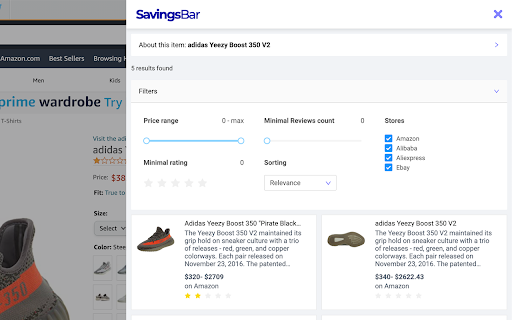
One Click Price Comparison. Start Saving Smartly
SavingsBar - Price Comparison Engine
Start Saving Smartly!
------------------------------
How does it work?
------------------------------
When you visit an online shop or a product page, SavingsBar activating and starts analyzing the content of current page in the background, in order to read product details of the offered product. If SavingsBar finds a better price, it simply shows a green note right on the icon in your web browser.
Depending on the available resources and the depth of product searching - the duration of the search query may differ from few seconds to minutes.
------------------------------
Privacy policy
------------------------------
https://savings.bar/privacy
| 分类 | 🛍️购物 |
| 插件标识 | ebpbpodkpkceaodnfdeigbcafahaakmo |
| 平台 | Chrome |
| 评分 |
☆☆☆☆☆
|
| 评分人数 | |
| 插件主页 | https://chromewebstore.google.com/detail/savings-bar-compare-price/ebpbpodkpkceaodnfdeigbcafahaakmo |
| 版本号 | 10.73.0.21483 |
| 大小 | 626KiB |
| 官网下载次数 | 27 |
| 下载地址 | |
| 更新时间 | 2021-08-12 00:00:00 |
CRX扩展文件安装方法
第1步: 打开Chrome浏览器的扩展程序
第2步:
在地址栏输入: chrome://extensions/
第3步: 开启右上角的【开发者模式】
第4步: 重启Chrome浏览器 (重要操作)
第5步: 重新打开扩展程序管理界面
第6步: 将下载的crx文件直接拖入页面完成安装
注意:请确保使用最新版本的Chrome浏览器