
Privacy Guardr Chrome 插件, crx 扩展下载
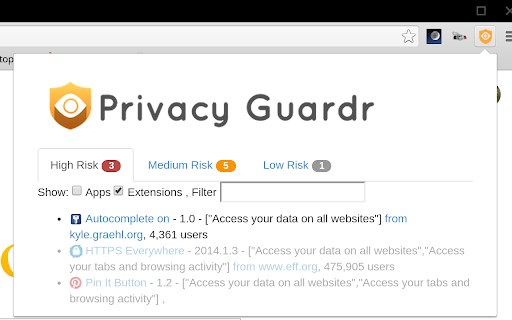
An extension to help you make informed decisions about the privacy implications of your installed extensions
Privacy Guardr (formely Privacy Guard) helps you identify extensions and apps that are a privacy risk. Protect yourself against malware and nefarious extensions that seek to compromise your browsing safely.
Privacy guard has many features to protect you from malware and unseemly applications. It is an open source project: https://github.com/kzahel/privacy-guard-extension
Update Feb 29 2020
- Remove unused notification permission
Update Dec 1 2014
- Changed name of app due to trademark conflict with privacyguard.com (credit monitoring service)
- Check permissions of installed extensions
- See extensions and apps with high risk permissions
- (soon) Identify changes to app publisher
Sept 12, 2014 - version 0.1.4
- Updated to detect "high risk" apps.
Jan 21, 2014 - First released. I wrote this app because I couldn't find anything else like it in the chrome web store and there's been a lot of buzz about chrome extension malware recently. I have some ideas for further improvements to make to this app, but welcome your feedback!
| 分类 | ♿无障碍访问 |
| 插件标识 | edcajbacgdcdeecojhlllbgingbjfbmk |
| 平台 | Chrome |
| 评分 |
☆☆☆☆☆
|
| 评分人数 | |
| 插件主页 | https://chromewebstore.google.com/detail/privacy-guardr/edcajbacgdcdeecojhlllbgingbjfbmk |
| 版本号 | 2.19.1 |
| 大小 | 410KiB |
| 官网下载次数 | 706 |
| 下载地址 | |
| 更新时间 | 2020-03-02 00:00:00 |
CRX扩展文件安装方法
第1步: 打开Chrome浏览器的扩展程序
第2步:
在地址栏输入: chrome://extensions/
第3步: 开启右上角的【开发者模式】
第4步: 重启Chrome浏览器 (重要操作)
第5步: 重新打开扩展程序管理界面
第6步: 将下载的crx文件直接拖入页面完成安装
注意:请确保使用最新版本的Chrome浏览器