
Social Media / Web Time Tracker Chrome 插件, crx 扩展下载
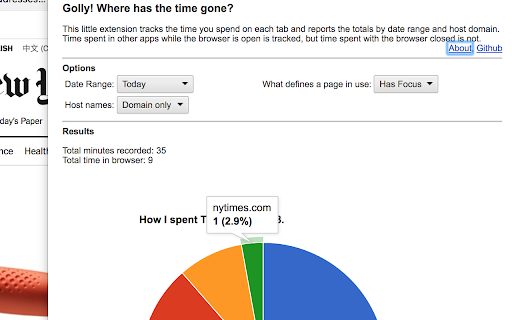
Tells you how much time you're spending/wasting on social media and other websites.
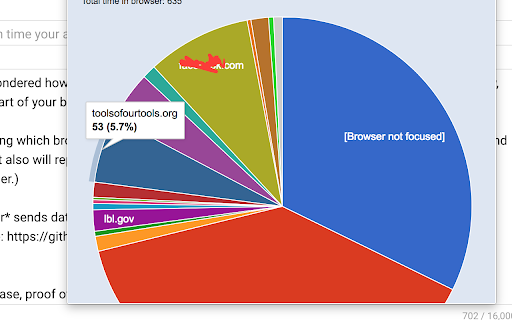
Have you ever wondered how much time you are spending on certain unnamed social media sites? This extension will let you know, showing a pie chart of your browser usage today, yesterday, last week, etc.
It works by tracking which browser tab is currently focused, or optionally, which tab(s) are visible (open and not minimized). It also will report time the browser is open but not focused. (Like if you're using another program altogether.)
This plugin *never* sends data anywhere. Everything stays local on your computer. You can inspect the source code here: https://github.com/djacobow/whttg
Versions:
0.0.1 -- initial release, proof of concept
0.0.2 -- minor bugs
0.0.3 -- output formatting
0.0.4 -- column chart option
0.0.5 -- icon, formatting
0.0.6/7 -- change name for better SEO
0.0.8 -- change name and remove references to a certain social media site after a take-down notice
0.0.9 -- remove google charts and replace with chartjs because of Google charts' dynamic loading and eval()
| 分类 | 🎉趣味休闲 |
| 插件标识 | egnaiijcamledealofbegimjfkcmmolg |
| 平台 | Chrome |
| 评分 |
☆☆☆☆☆
|
| 评分人数 | |
| 插件主页 | https://chromewebstore.google.com/detail/social-media-web-time-tra/egnaiijcamledealofbegimjfkcmmolg |
| 版本号 | 3.0.0.18 |
| 大小 | 775KiB |
| 官网下载次数 | 38 |
| 下载地址 | |
| 更新时间 | 2018-04-27 00:00:00 |
CRX扩展文件安装方法
第1步: 打开Chrome浏览器的扩展程序
第2步:
在地址栏输入: chrome://extensions/
第3步: 开启右上角的【开发者模式】
第4步: 重启Chrome浏览器 (重要操作)
第5步: 重新打开扩展程序管理界面
第6步: 将下载的crx文件直接拖入页面完成安装
注意:请确保使用最新版本的Chrome浏览器