
Bookmarks in Google Chrome 插件, crx 扩展下载
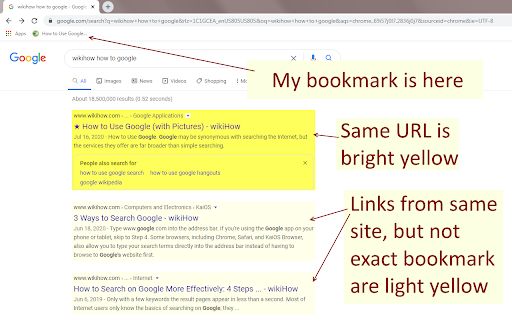

What does this extension do?
When making use of Google search, this extension will highlight websites which are in your bookmarks.…
What does this extension do?
When making use of Google search, this extension will highlight websites which are in your bookmarks. If the link is exactly the same, it will be bright yellow with a star next to it. If the link is from the same domain name as a bookmark, it will be highlighted with a softer yellow.
Great. Why?
A long time ago bookmarks were the way to navigate to your favorite websites. Nowadays, a quick google search will take you there. Here is where some people may encounter a problem.
The web is swimming with phishing websites — websites with harmful intent pretending to be the website you're trying to get to. One such way hackers abuse phishing websites is through logins. If you type your login details into such phishing websites, they'll have your login information and are sure to abuse it.
This may not be a problem when searching for "Youtube" or other extremely popular websites. However, such hackers will have an easier time phishing with less popular websites. This is where bookmarks could help your security. When you click on that bookmark, you know you are going to the same website you've been to last time.
Yet, many people's muscle memory is to Google the website they want to go to. This is where this extension comes in. First, bookmark your favorite websites. Then, when you want to access one of them, you can Google it as usual. If a result is highlighted yellow, then you can be sure that it is the website you're looking for. If the website has no highlight, then it is not in your bookmarks and may be a phishing website (if you are sure you bookmarked it).
| 分类 | 🛠️工具 |
| 插件标识 | egnehfkdejemmjlgphgeblpaocmakphe |
| 平台 | Chrome |
| 评分 |
☆☆☆☆☆
|
| 评分人数 | |
| 插件主页 | https://chromewebstore.google.com/detail/bookmarks-in-google/egnehfkdejemmjlgphgeblpaocmakphe |
| 版本号 | 1.0.0.47 |
| 大小 | 256KiB |
| 官网下载次数 | 43 |
| 下载地址 | |
| 更新时间 | 2020-07-31 00:00:00 |
CRX扩展文件安装方法
第1步: 打开Chrome浏览器的扩展程序
第2步:
在地址栏输入: chrome://extensions/
第3步: 开启右上角的【开发者模式】
第4步: 重启Chrome浏览器 (重要操作)
第5步: 重新打开扩展程序管理界面
第6步: 将下载的crx文件直接拖入页面完成安装
注意:请确保使用最新版本的Chrome浏览器