
Raccoony WebExtension Chrome 插件, crx 扩展下载
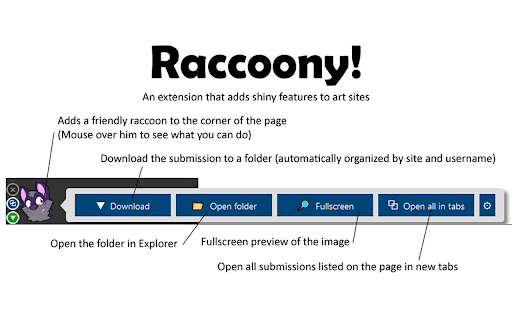
A WebExtension for adding shiny features to art websites.
A web extension for Chrome that adds shiny new features like automatic downloading, opening submission lists in tabs, and a fullscreen preview to art sites.
Features:
- Download submissions from supported art sites and have them organized into folders automatically with one click
- Automatically download submissions from supported art sites (if enabled in settings)
- Download any image or media from any website with Raccoony via right-click menu
- Open all submissions in a gallery or in your watchlist/follower notifications from supported sites in new tabs for easy perusal
- Show pictures in a "full-screen" view that covers the entire page, making the artwork front-and-center (and optionally enter this view automatically)
- Hotkey support for downloading, opening in tabs and fullscreen
- Save metadata (like title and description) in a file alongside the submission (if enabled in settings)
- Supported sites: deviantArt, e621, Eka's Portal, FurAffinity, Furry Network, InkBunny, Patreon, Shorpy.com, SoFurry, and Weasyl with others planned or on the way.
| 分类 | 🎉趣味休闲 |
| 插件标识 | ejcbnfgeiphhnkmpjggnkkhnbefihelh |
| 平台 | Chrome |
| 评分 |
☆☆☆☆☆
|
| 评分人数 | |
| 插件主页 | https://chromewebstore.google.com/detail/raccoony-webextension/ejcbnfgeiphhnkmpjggnkkhnbefihelh |
| 版本号 | 1.2.5 |
| 大小 | 719KiB |
| 官网下载次数 | 1000 |
| 下载地址 | |
| 更新时间 | 2021-09-09 00:00:00 |
CRX扩展文件安装方法
第1步: 打开Chrome浏览器的扩展程序
第2步:
在地址栏输入: chrome://extensions/
第3步: 开启右上角的【开发者模式】
第4步: 重启Chrome浏览器 (重要操作)
第5步: 重新打开扩展程序管理界面
第6步: 将下载的crx文件直接拖入页面完成安装
注意:请确保使用最新版本的Chrome浏览器