
SkipTo Chrome 插件, crx 扩展下载



Skip to the best part of a YouTube video!
SkipTo - skip to the best parts of a YouTube video!
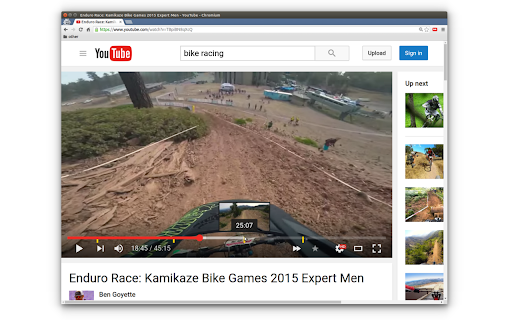
With a click of a button, SkipTo gets you to the best part of a YouTube video. SkipTo adds 3 new things to your YouTube video player:
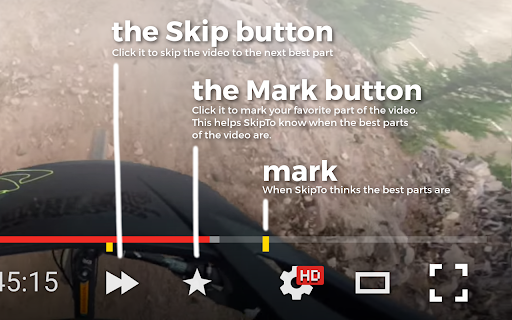
First, SkipTo will add yellow markers to the video's timeline - these are when SkipTo thinks the best parts of the video are.
Secondly, SkipTo adds the Skip button to the YouTube video player. When clicked, the Skip button skips you to the next best part in the video.
Finally, SkipTo adds the Mark button to the YouTube video player. When you find your favorite part of the video, click the Mark button - this helps out SkipTo in calculating the best parts of the video.
Thank you for checking out SkipTo! SkipTo is completely free - we don't store any personal data nor do we put up ads!
Have a question? Thought of a cool feature? Found a bug? Email SkipTo at [email protected]
Follow SkipTo on Twitter: https://twitter.com/skiptoextension
Like SkipTo on Facebook: https://www.facebook.com/SkipTo-1728531700735838
View source code on GitHub: https://github.com/SkipTo/SkipTo
| 分类 | ♿无障碍访问 |
| 插件标识 | ejodhjghjlaiccblbppbaaabdcllfhgm |
| 平台 | Chrome |
| 评分 |
☆☆☆☆☆
|
| 评分人数 | |
| 插件主页 | https://chromewebstore.google.com/detail/skipto/ejodhjghjlaiccblbppbaaabdcllfhgm |
| 版本号 | 2.19.1 |
| 大小 | 195KiB |
| 官网下载次数 | 158 |
| 下载地址 | |
| 更新时间 | 2016-06-06 00:00:00 |
CRX扩展文件安装方法
第1步: 打开Chrome浏览器的扩展程序
第2步:
在地址栏输入: chrome://extensions/
第3步: 开启右上角的【开发者模式】
第4步: 重启Chrome浏览器 (重要操作)
第5步: 重新打开扩展程序管理界面
第6步: 将下载的crx文件直接拖入页面完成安装
注意:请确保使用最新版本的Chrome浏览器