
Full Width for Google Search Console Chrome 插件, crx 扩展下载
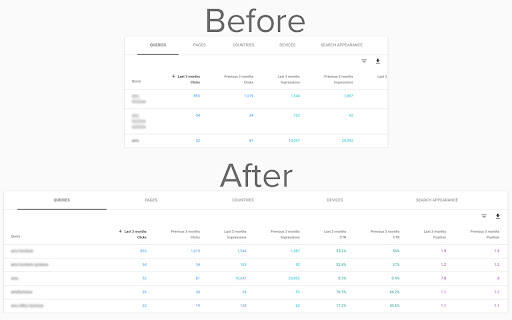
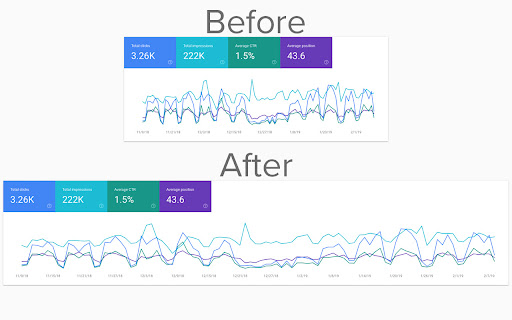
View Google Search Console at full width
A must-have extension for anyone who uses Google Search Console frequently.
This extension adds a line of CSS to the GSC layout to force it full-width - and it looks great.
Now you can compare date ranges, clicks, impressions and more all at the same time without needing to scroll left and right to view each side of the table.
The new Google Search Console design is great - it looks so much better than the old. But it's not perfect..
The new layout displays the data visualisations (in the "Performance" report, for example) in a boxed area that limits how much data you can see at one time - that's where GSC Full Width comes in.
The extension is extremely lightweight - a few kb in total - and will not slow down page load times. It seamlessly modifies the layout in such a way that you won't even know it's there until you visit Search Console without the extension.
There are no bells and whistles, no options menus, no set up at all required - just install and go.
Change log:
- 1.1.5: Updated to fix full-width view when left menu was closed.
Extension created in partnership with Alpha Digital (https://alphadigital.com.au)
| 分类 | 📝工作流程与规划 |
| 插件标识 | eklcbfkfhemcgponnlbafdiiofbnopdn |
| 平台 | Chrome |
| 评分 |
☆☆☆☆☆
|
| 评分人数 | |
| 插件主页 | https://chromewebstore.google.com/detail/full-width-for-google-sea/eklcbfkfhemcgponnlbafdiiofbnopdn |
| 版本号 | 2.5 |
| 大小 | 15.38KiB |
| 官网下载次数 | 2000 |
| 下载地址 | |
| 更新时间 | 2022-02-15 00:00:00 |
CRX扩展文件安装方法
第1步: 打开Chrome浏览器的扩展程序
第2步:
在地址栏输入: chrome://extensions/
第3步: 开启右上角的【开发者模式】
第4步: 重启Chrome浏览器 (重要操作)
第5步: 重新打开扩展程序管理界面
第6步: 将下载的crx文件直接拖入页面完成安装
注意:请确保使用最新版本的Chrome浏览器