
Trello Card Aging Chrome 插件, crx 扩展下载
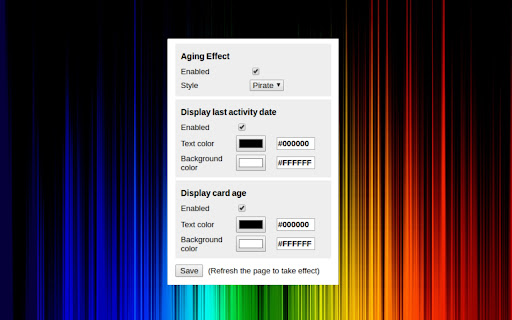


Provides some features for Trello, related with the card activity
Provides some features for Trello, related with the card activity:
- Last activity
Creates an indicator at the bottom of the card, that shows the time difference between now and the last activity of the card.
- Card age
Creates an indicator at the bottom of the card, that shows the time difference between now and the card creation.
- Aging effect
The aging effect is the same as the one provided from the Card Aging power-up, except for one detail: In the official power up, the card aging is removed if someone just change the card position (drag and drop) inside a list. This extension considers the last activity of the card, what might be a comment, attachment, anything who left a log inside the card.
The aging is applied in 3 states, at 7, 14, or 28 days without any action in the card.
This project is open-source, feel free to contribute or make a suggestion:
https://github.com/fernand-o/trello-card-aging
| 分类 | 📝工作流程与规划 |
| 插件标识 | eldafhhjhnfgkhpnicalopgocdbehkgj |
| 平台 | Chrome |
| 评分 |
☆☆☆☆☆
|
| 评分人数 | |
| 插件主页 | https://chromewebstore.google.com/detail/trello-card-aging/eldafhhjhnfgkhpnicalopgocdbehkgj |
| 版本号 | 1.1.1 |
| 大小 | 111KiB |
| 官网下载次数 | 677 |
| 下载地址 | |
| 更新时间 | 2018-06-02 00:00:00 |
CRX扩展文件安装方法
第1步: 打开Chrome浏览器的扩展程序
第2步:
在地址栏输入: chrome://extensions/
第3步: 开启右上角的【开发者模式】
第4步: 重启Chrome浏览器 (重要操作)
第5步: 重新打开扩展程序管理界面
第6步: 将下载的crx文件直接拖入页面完成安装
注意:请确保使用最新版本的Chrome浏览器