
Comodo AdBlocker Chrome 插件, crx 扩展下载
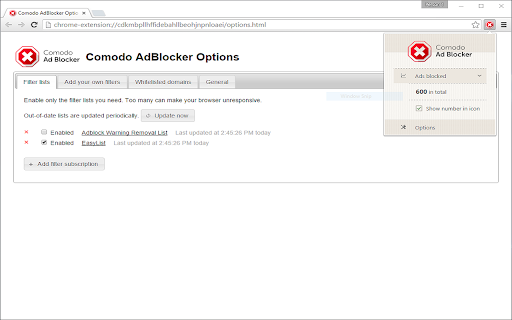
Based on the same open source codebase used by over 50 million people, improved by blocking malware, tracking & ALL display ads
Comodo AdBlocker has been built using the same open source ad blocker code base used by over 50 million people but improved by blocking malware, tracking and ALL display ads.
Using Comodo AdBlocker will have the following benefits for your browsing:
Malvertising Protection
Web advertisements are being increasingly used as vehicles for distributing malware.
A legitimate ad can be infected by a virus or a fraudulent ad can be introduced into a network that places ads on web sites.
Faster Browsing
An ad can slow your computer and use up CPU time by reading and writing cookies, making many connections and downloading unwanted software.
“Malvertising” and other inefficient ads slow your browser’s performance by running processor intensive scripts and by reading and writing many cookies on your computer.
Improved Privacy
Cookies, Spyware and other malware spread through advertising banners can monitor your activities and steal your personal information.
| 分类 | 📝工作流程与规划 |
| 插件标识 | elhcnbjoomhmifmfeggoalmplblcmcin |
| 平台 | Chrome |
| 评分 |
☆☆☆☆☆
|
| 评分人数 | |
| 插件主页 | https://chromewebstore.google.com/detail/comodo-adblocker/elhcnbjoomhmifmfeggoalmplblcmcin |
| 版本号 | 5.0.199 |
| 大小 | 487KiB |
| 官网下载次数 | 5000 |
| 下载地址 | |
| 更新时间 | 2016-01-20 00:00:00 |
CRX扩展文件安装方法
第1步: 打开Chrome浏览器的扩展程序
第2步:
在地址栏输入: chrome://extensions/
第3步: 开启右上角的【开发者模式】
第4步: 重启Chrome浏览器 (重要操作)
第5步: 重新打开扩展程序管理界面
第6步: 将下载的crx文件直接拖入页面完成安装
注意:请确保使用最新版本的Chrome浏览器