
TweetBlock Chrome 插件, crx 扩展下载
Block specific tweets from appearing on your timeline without blocking the user creating them.
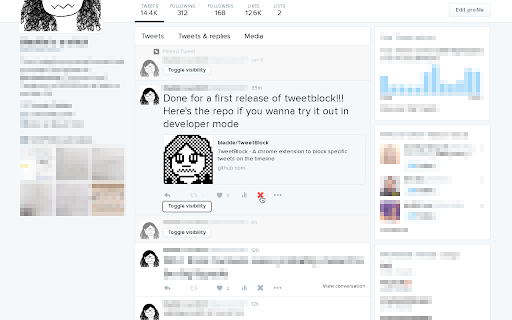
TweetBlock is a chrome extension to block specific tweets from appearing on your timeline, without blocking the user creating them.
There are a few reasons why this little feature would be useful:
- There is a very popular tweet everyone in your feed is retweeting that you just don't want to see.
- There's an untagged tweet that makes you very uncomfortable.
- Your very good friend is in a odd meme mood and is posting pictures of lewd minions every 30 seconds and you're at work.
Once installed TweetBlock will add a small "X" button on each tweet which will allow you to block it. Blocked tweets appear in a collapsed state that can be expanded with the "toggle visibility" button. Tweets can be unblocked by re-clicking the "X" or visiting the options page, where a list of all blocked tweets can be viewed.
This extension is currently in very-beta release. If you find a bug please report it to the github repo (set as the webpage for this extension.)
Happy blocking!
| 分类 | 👥社交 |
| 插件标识 | emgeioodbdkocgffmnfdhjldnefeikeb |
| 平台 | Chrome |
| 评分 |
☆☆☆☆☆
|
| 评分人数 | |
| 插件主页 | https://chromewebstore.google.com/detail/tweetblock/emgeioodbdkocgffmnfdhjldnefeikeb |
| 版本号 | 1.5.0 |
| 大小 | 769KiB |
| 官网下载次数 | 29 |
| 下载地址 | |
| 更新时间 | 2016-06-10 00:00:00 |
CRX扩展文件安装方法
第1步: 打开Chrome浏览器的扩展程序
第2步:
在地址栏输入: chrome://extensions/
第3步: 开启右上角的【开发者模式】
第4步: 重启Chrome浏览器 (重要操作)
第5步: 重新打开扩展程序管理界面
第6步: 将下载的crx文件直接拖入页面完成安装
注意:请确保使用最新版本的Chrome浏览器