
Do Not Track Chrome 插件, crx 扩展下载
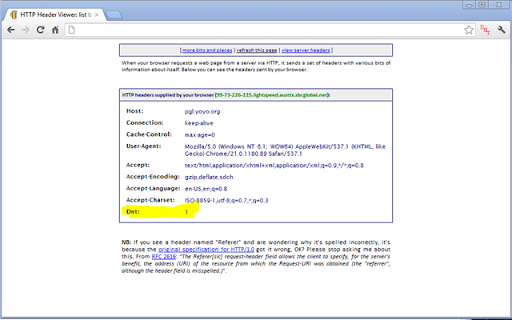
Provides Do Not Track (DNT) request HEADER injector to opt in or out of universal tracking for ALL browser requests.
Avoid Being Tracked By Websites
Do Not Track (DNT) is a technology and policy proposal that enables users to opt out of tracking by websites they do not visit, including analytics services, advertising networks, and social platforms.
This extension is a barebones, simple HTTP request HEADER injector of DNT opt in or out for ALL browser requests. Opting in of DNT prevents any and ALL websites from tracking you.
Simply click the DNT extension icon to opt in (enable prevent tracking) or opt out (disable - allow tracking).
For more information on DNT:
* http://en.wikipedia.org/wiki/Do_not_track_header
Feel free to browser or modify source code via Github:
* https://github.com/cjbarker/Do-Not-Track
| 分类 | 📝工作流程与规划 |
| 插件标识 | epaickocpjcjjiopbdlahnnkpljdlchm |
| 平台 | Chrome |
| 评分 |
☆☆☆☆☆
|
| 评分人数 | |
| 插件主页 | https://chromewebstore.google.com/detail/do-not-track/epaickocpjcjjiopbdlahnnkpljdlchm |
| 版本号 | 25.2.3.0 |
| 大小 | 14.97KiB |
| 官网下载次数 | 2000 |
| 下载地址 | |
| 更新时间 | 2012-09-11 00:00:00 |
CRX扩展文件安装方法
第1步: 打开Chrome浏览器的扩展程序
第2步:
在地址栏输入: chrome://extensions/
第3步: 开启右上角的【开发者模式】
第4步: 重启Chrome浏览器 (重要操作)
第5步: 重新打开扩展程序管理界面
第6步: 将下载的crx文件直接拖入页面完成安装
注意:请确保使用最新版本的Chrome浏览器