
Go Search Extension Chrome 插件, crx 扩展下载
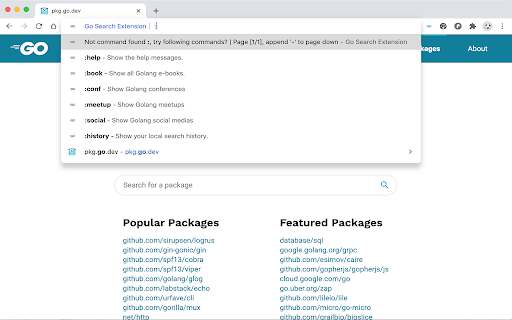
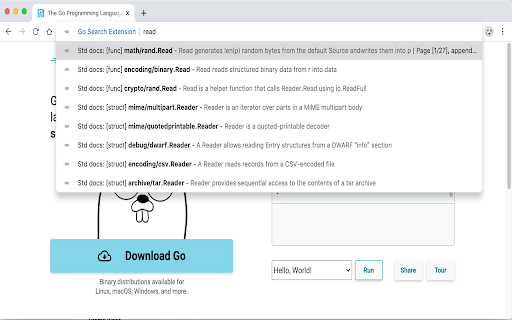
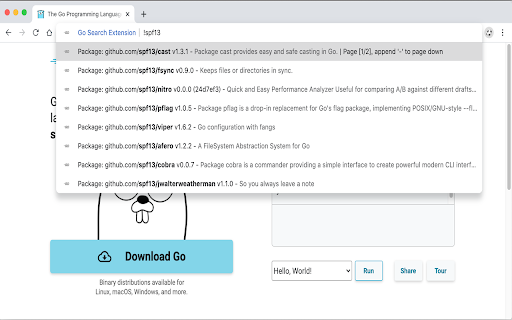
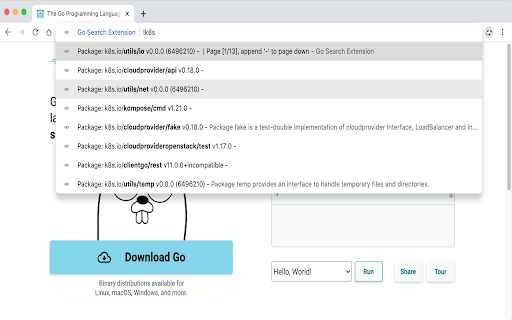
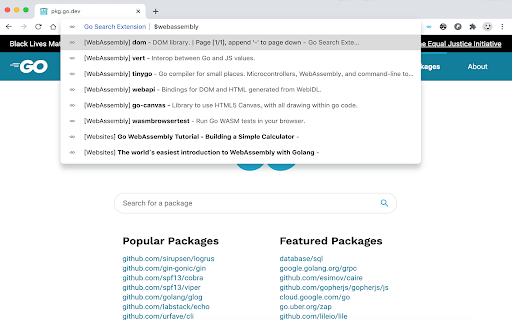
Search Golang std docs and third packages in your address bar instantly!
Golang Search is a handy browser plugin to help the Golang developers searching standard docs and libraries in the address bar instantly.
We believe that your privacy is a fundamental right, hence using Golang Search will never come at the expense of your privacy.
⭐️ Features
- Search Golang standard library docs
- Search Golang libraries on https://pkg.go.dev
⭐️ How to use it
Input keyword `go` in the address bar, press `Space` to activate the search bar. Then enter any keyword to search, the extension will response the related search results instantly.
Github: https://github.com/huhu/go-search-extension
Privacy policy: https://github.com/huhu/privacy-policies/blob/master/privacy/go-search-extension.md
Should you have any feedback or suggestion, please send your message to [email protected]. We love users like you!
| 分类 | 💻开发者工具 |
| 插件标识 | epanejkfcekejmmfbcpbcbigfpefbnlb |
| 平台 | Chrome |
| 评分 |
☆☆☆☆☆
|
| 评分人数 | |
| 插件主页 | https://chromewebstore.google.com/detail/go-search-extension/epanejkfcekejmmfbcpbcbigfpefbnlb |
| 版本号 | 8.3 |
| 大小 | 685KiB |
| 官网下载次数 | 825 |
| 下载地址 | |
| 更新时间 | 2020-07-03 00:00:00 |
CRX扩展文件安装方法
第1步: 打开Chrome浏览器的扩展程序
第2步:
在地址栏输入: chrome://extensions/
第3步: 开启右上角的【开发者模式】
第4步: 重启Chrome浏览器 (重要操作)
第5步: 重新打开扩展程序管理界面
第6步: 将下载的crx文件直接拖入页面完成安装
注意:请确保使用最新版本的Chrome浏览器