
SmartyList Chrome 插件, crx 扩展下载
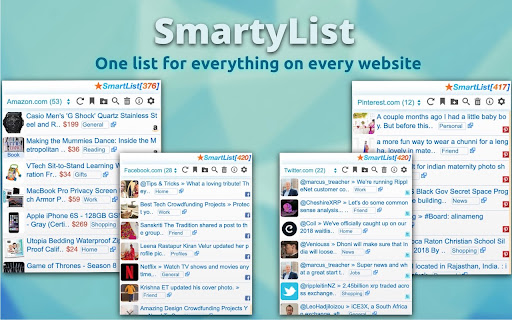


Helps you save favorite information and links in an awesome and interactive way.
SmartyList helps you shortlist favorite products, photos, videos, news, profiles, links, or any custom data in an awesome and interactive way.
Users can quickly create 'Shortlist' of any relevant data on popular (supported, like e-commerce, social networks, news, entertainment etc.) websites by a single click, and are accessible (visually) across those websites as one common list. It's a new free-style browsing experience on the web!!
Why it requires read/write access?
Because it needs to process the content directly on your site and then writes/displays Shortlist buttons and its UI panel
For use cases, screenshots, demos, help or FAQs, visit - https://smartylist.com/links.html
| 分类 | 📝工作流程与规划 |
| 插件标识 | epbklomkmclcfchhiiogggcghmhaojej |
| 平台 | Chrome |
| 评分 |
☆☆☆☆☆
|
| 评分人数 | |
| 插件主页 | https://chromewebstore.google.com/detail/smartylist/epbklomkmclcfchhiiogggcghmhaojej |
| 版本号 | 25.2.3.0 |
| 大小 | 356KiB |
| 官网下载次数 | 15 |
| 下载地址 | |
| 更新时间 | 2021-09-11 00:00:00 |
CRX扩展文件安装方法
第1步: 打开Chrome浏览器的扩展程序
第2步:
在地址栏输入: chrome://extensions/
第3步: 开启右上角的【开发者模式】
第4步: 重启Chrome浏览器 (重要操作)
第5步: 重新打开扩展程序管理界面
第6步: 将下载的crx文件直接拖入页面完成安装
注意:请确保使用最新版本的Chrome浏览器