
Extreme Markup Editor for Blogger™ Chrome 插件, crx 扩展下载
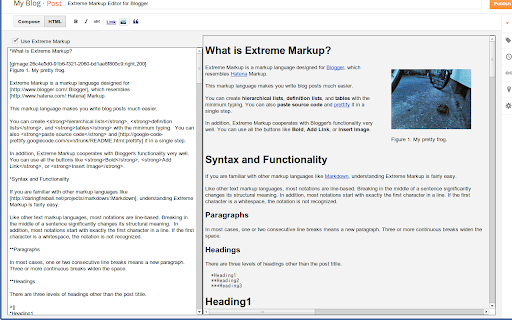
Write blog posts with Extreme Markup, which resembles Hatena Markup and is much easier to use than Markdown.
Extreme Markup is a markup language designed for Blogger, which resembles Hatena Markup (はてな記法).
This markup language makes you write blog posts much easier.
You can create hierarchical lists, definition lists, and tables with the minimum typing. You can also paste source code and prettify it in a single step.
In addition, the editor, specialized for editing Extreme Markup, cooperates with Blogger's functionality very well. You can use all the buttons like Bold, Add Link, or Insert Image.
If you are a programmer or familiar with text editors rather than word processors, this extension must be a perfect solution.
Features
* Paragraphs
* Headings
* Hierarchical Lists
* Definition Lists
* Tables
* Blockquotes
* Pre-formatted Texts
* Source Code
* Footnotes
* Raw HTML Tags
* Links
* Images
* LaTeX
For details, please visit:
http://extreme-markup.blogspot.jp/p/syntax-and-features.html .
| 分类 | 👥社交 |
| 插件标识 | epjlelpgajbfpcdohkbaeaindpcjpfhi |
| 平台 | Chrome |
| 评分 |
☆☆☆☆☆
|
| 评分人数 | |
| 插件主页 | https://chromewebstore.google.com/detail/extreme-markup-editor-for/epjlelpgajbfpcdohkbaeaindpcjpfhi |
| 版本号 | 3.128.4 |
| 大小 | 22.57KiB |
| 官网下载次数 | 860 |
| 下载地址 | |
| 更新时间 | 2015-02-26 00:00:00 |
CRX扩展文件安装方法
第1步: 打开Chrome浏览器的扩展程序
第2步:
在地址栏输入: chrome://extensions/
第3步: 开启右上角的【开发者模式】
第4步: 重启Chrome浏览器 (重要操作)
第5步: 重新打开扩展程序管理界面
第6步: 将下载的crx文件直接拖入页面完成安装
注意:请确保使用最新版本的Chrome浏览器