
Canvas Sticker Themer Chrome 插件, crx 扩展下载
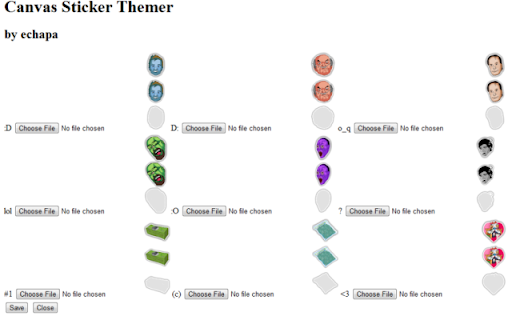

Use your own custom stickers on Canvas http://canv.as
This extension allows you to use your own custom stickers on Canvas.
Version 2.1:
+ Added individual sticker reset.
Version 2.0.2:
+ Fixed a bug when customizing the tacnyan sticker.
Version 2.0.1:
+ Fixed the reset button to include epics.
Version 2.0:
+ Epic stickers support.
Version 1.9.1:
+ Support for "Official" sticker packs.
Version 1.8:
+ Redesigned Options page.
Version 1.7:
+ The sticker preview now loads right after a sticker file is selected.
+ Stickers are saved as soon as they are selected on the Options page.
+ The Save button was removed as it's no longer required.
Version 1.6:
+ Added a reset button to load the original Canvas stickers.
Version 1.5 fixes:
+ Added "Get more stickers" link on the Options page.
Version 1.4 fixes:
+ Default Canvas stickers are left alone until they are customized in the Options page.
Stickers on the examples made by Narge http://canv.as/user/narge
| 分类 | 🎉趣味休闲 |
| 插件标识 | fadbibgnokiieidcanclaniaelejfncl |
| 平台 | Chrome |
| 评分 |
☆☆☆☆☆
|
| 评分人数 | |
| 插件主页 | https://chromewebstore.google.com/detail/canvas-sticker-themer/fadbibgnokiieidcanclaniaelejfncl |
| 版本号 | 3.0.0.18 |
| 大小 | 11.04KiB |
| 官网下载次数 | 33 |
| 下载地址 | |
| 更新时间 | 2015-02-17 00:00:00 |
CRX扩展文件安装方法
第1步: 打开Chrome浏览器的扩展程序
第2步:
在地址栏输入: chrome://extensions/
第3步: 开启右上角的【开发者模式】
第4步: 重启Chrome浏览器 (重要操作)
第5步: 重新打开扩展程序管理界面
第6步: 将下载的crx文件直接拖入页面完成安装
注意:请确保使用最新版本的Chrome浏览器