
Gmail Labels as Tabs Chrome 插件, crx 扩展下载
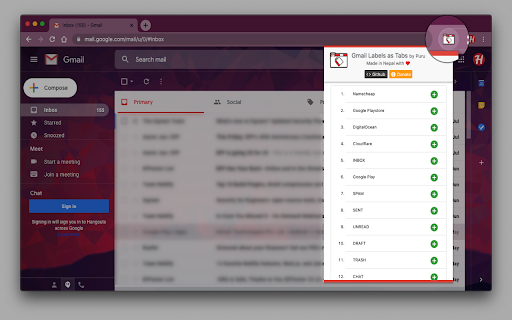
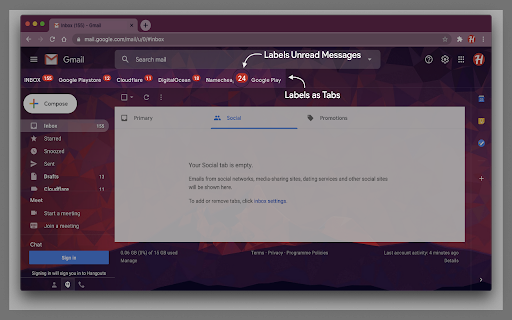

Organize your Gmail mailbox labels as tabs.
"Gmail Labels as Tabs" is an open-source email productivity extension for Google Chrome that customizes your Gmail interface by adding Gmail labels as tabs.
★ Organize your labels as Gmail tabs
★ Drag and drop to re-arrange tabs
★ Shows unread messages badge
★ Supports dark mode theme
★ Synchronizes extension settings with your Gmail account
★ 100% open-source and ads-free - we don’t mine your data, we don’t sell your data
?? Github
▶ https://github.com/tuladhar/gmail-labels-as-tabs
❤️ Support my work
▶ https://tuladhar.github.io/gmail-labels-as-tabs/DONATION
| 分类 | 📝工作流程与规划 |
| 插件标识 | fadllmncpdhaindodhlgbheephdkopih |
| 平台 | Chrome |
| 评分 |
☆☆☆☆☆
|
| 评分人数 | |
| 插件主页 | https://chromewebstore.google.com/detail/gmail-labels-as-tabs/fadllmncpdhaindodhlgbheephdkopih |
| 版本号 | 6.94 |
| 大小 | 135KiB |
| 官网下载次数 | 166 |
| 下载地址 | |
| 更新时间 | 2020-08-25 00:00:00 |
CRX扩展文件安装方法
第1步: 打开Chrome浏览器的扩展程序
第2步:
在地址栏输入: chrome://extensions/
第3步: 开启右上角的【开发者模式】
第4步: 重启Chrome浏览器 (重要操作)
第5步: 重新打开扩展程序管理界面
第6步: 将下载的crx文件直接拖入页面完成安装
注意:请确保使用最新版本的Chrome浏览器