
Income Tax Credential Manager Chrome 插件, crx 扩展下载
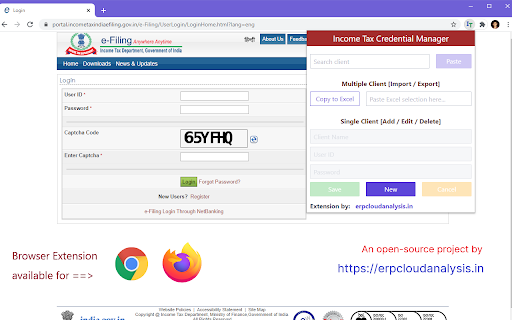
Browser Extension for managing Income Tax website credentials with one-click copy-paste functionality
This is a browser extension of easy management of your client credential of Income Tax. It is loaded with following functionalities
1) One-click Paste button to auto-fill User ID and password on https://www.incometaxindiaefiling.gov.in login page
2) Searching client by name instead of complicated PAN
3) Copy-Paste based import of multiple client credentials via simple Excel template
4) Quick export (or backup) of client credentials to Excel file
Extension maintains complete privacy of credentials as they are stored there itself in browser storage (specific to that PC). Extension does not sends any data to external website.
As part of Open-Source inititative and for maintaining complete transparency, source code of this extension is made available on below URL
https://github.com/dhananjay1405/income-tax-credential-manager
For any queries, doubts, issue, feedback, suggesations please contact developer
Developed & Maintained by: CA Dhananjay Gokhale
Email: [email protected]
Whatsapp/Telegram: (+91) 90284-63366
| 分类 | 📝工作流程与规划 |
| 插件标识 | fcoeelnejimjadoffcopbkkcbggfmmfa |
| 平台 | Chrome |
| 评分 |
☆☆☆☆☆
|
| 评分人数 | |
| 插件主页 | https://chromewebstore.google.com/detail/income-tax-credential-man/fcoeelnejimjadoffcopbkkcbggfmmfa |
| 版本号 | 1.0 |
| 大小 | 42.17KiB |
| 官网下载次数 | 555 |
| 下载地址 | |
| 更新时间 | 2020-07-15 00:00:00 |
CRX扩展文件安装方法
第1步: 打开Chrome浏览器的扩展程序
第2步:
在地址栏输入: chrome://extensions/
第3步: 开启右上角的【开发者模式】
第4步: 重启Chrome浏览器 (重要操作)
第5步: 重新打开扩展程序管理界面
第6步: 将下载的crx文件直接拖入页面完成安装
注意:请确保使用最新版本的Chrome浏览器