
Password Assistant Chrome 插件, crx 扩展下载
Password management solution
Passwords are used everyday and are an important part of protecting your accounts. As the number of services requiring passwords increases so does the need for a way to manage multiple passwords. However remembering different passwords for your email, bank account, and social media account can be an impossible task and when some services require you to change your password every 6 months it becomes even more of an issue. So how do you manage all these passwords? Well you could use a common and unsecured password across all your accounts and then have to change all your passwords if your password gets stolen and hope you changed them all, or you can use Password Assistant!
With Password Assistant you can create unique passwords for each of your accounts, and can access these passwords across multiple devices!
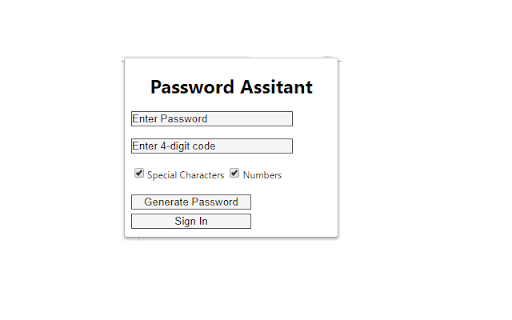
So what makes Password Assistant different from other password management software? Most password managers randomly generate a password and then store it on your device. While this creates a password that is hard to figure out for someone who wants to steal your password, it also creates a password that you can not access from anywhere but that device but if that device is lost or breaks you lose all of your passwords. This is where Password Assistant comes in. With Password Assistant a password is generated from a password or phrase, a 4-digit pin, and other settings you can choose from. This allows you to have access to your passwords on any device that has Password Assistant installed! But now you are thinking I still have to remember multiple passwords, but you are wrong. Password Assistant uses what we call modifiers, which you can create for each password you want. With the modifiers you can use the same password and 4-digit code for each password and still get different passwords generated for each one!
Download Password Assistant today and start taking steps to increase your online security!
By installing and using this app you agree with the Terms of Service:
https://sites.google.com/view/p-assistant-terms-of-service/home
| 分类 | 📝工作流程与规划 |
| 插件标识 | fefgbdipgjhdeindoaggjgbogpelddhg |
| 平台 | Chrome |
| 评分 |
☆☆☆☆☆
|
| 评分人数 | |
| 插件主页 | https://chromewebstore.google.com/detail/password-assistant/fefgbdipgjhdeindoaggjgbogpelddhg |
| 版本号 | 25.2.3.0 |
| 大小 | 37.91KiB |
| 官网下载次数 | 34 |
| 下载地址 | |
| 更新时间 | 2019-03-15 00:00:00 |
CRX扩展文件安装方法
第1步: 打开Chrome浏览器的扩展程序
第2步:
在地址栏输入: chrome://extensions/
第3步: 开启右上角的【开发者模式】
第4步: 重启Chrome浏览器 (重要操作)
第5步: 重新打开扩展程序管理界面
第6步: 将下载的crx文件直接拖入页面完成安装
注意:请确保使用最新版本的Chrome浏览器