
ePRINTit for Chromebooks Chrome 插件, crx 扩展下载

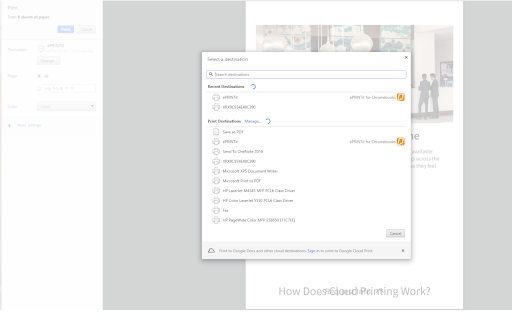
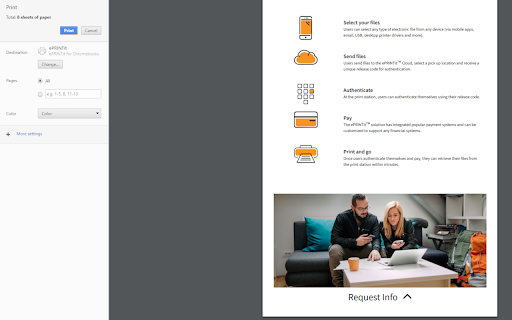
Print your favourite content to any participating ePRINTit partner print location around the world
ePRINTit™ for Chromebooks is an extension that enables Google Chrome and Chromebook users to print all of their favourite content to any participating ePRINTit™ partner print location around the world!
With tens of thousands of print locations situated across the globe, users are always presented with ultra-convenient print locations and can print from anywhere, to anywhere, via the ePRINTit™ Chromebooks extension.
How it Works?
1. Create an account at (companyname).eprintit.com with your chromebook email address as the login.
2. Download the ePRINTit™ for Chromebooks extension to your Chrome browser or Chromebook.
3. After selecting print from your browser, select the ePRINTit™ option and hit print.
4. Print jobs are added to your user portal and simultaneously uploaded to the secure ePRINTit™ cloud.
5. You can then choose your desired print pickup location from their your portal, and subsequently proceed to pick up your print job.
6. Print costs are automatically deducted from your user account, or may be paid directly at the print release station.
Key Features & Benefits:
• End-to-end document protection with ePRINTit™’s secure cloud-based solution
• Convenient printing of all documents at anytime, from anywhere
• Don’t download documents, print directly from your Chromebook or Chrome browser!
• Quick and seamless installation
• User friendly interface for optimal user experience
---Requirements---
Download ePRINTit™ for Chromebooks today and experience convenient, seamless, and secure printing like never before!
| 分类 | 📝工作流程与规划 |
| 插件标识 | fenicnflhkgjpafhdkhafpbponanbjem |
| 平台 | Chrome |
| 评分 |
☆☆☆☆☆
|
| 评分人数 | |
| 插件主页 | https://chromewebstore.google.com/detail/eprintit-for-chromebooks/fenicnflhkgjpafhdkhafpbponanbjem |
| 版本号 | 25.2.3.0 |
| 大小 | 45.61KiB |
| 官网下载次数 | 81 |
| 下载地址 | |
| 更新时间 | 2019-09-25 00:00:00 |
CRX扩展文件安装方法
第1步: 打开Chrome浏览器的扩展程序
第2步:
在地址栏输入: chrome://extensions/
第3步: 开启右上角的【开发者模式】
第4步: 重启Chrome浏览器 (重要操作)
第5步: 重新打开扩展程序管理界面
第6步: 将下载的crx文件直接拖入页面完成安装
注意:请确保使用最新版本的Chrome浏览器