
TablePlus Chrome 插件, crx 扩展下载
Transform and paste tables from your clipboard, especially into Jira.
Transforms tabular text stored in the clipboard to generate markup text useful in applications such as Jira.
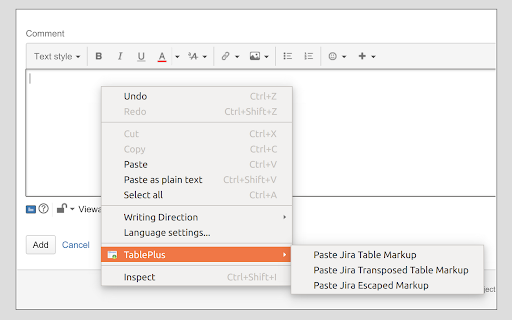
TablePlus adds entries to the context (right-click) menu in Google Chrome, so that when you are entering text you can do some enhanced pasting:
* Paste Jira Table Markup
* Paste Jira Transposed Table Markup
* Paste Jira Escaped Markup
If you work regularly with tabular data, you will find that TablePlus makes it much easier to create clear and readable comments, eliminating the need to build the markup text by manually typing it in, or generating it with external applications.
You can find more detailed examples at the home website below, along with links to download the source code, log bug reports, or make new feature requests.
During installation, Chrome may warn you that the extension can collect all site data, but it doesn't actually do that. You are free to look at the source code.
Known Issues:
* Tabular data containing line-feeds within cells may not render properly.
| 分类 | 📝工作流程与规划 |
| 插件标识 | fhgekekdakigpdfdppllmpackoklhklb |
| 平台 | Chrome |
| 评分 |
☆☆☆☆☆
|
| 评分人数 | |
| 插件主页 | https://chromewebstore.google.com/detail/tableplus/fhgekekdakigpdfdppllmpackoklhklb |
| 版本号 | 25.2.3.0 |
| 大小 | 54.8KiB |
| 官网下载次数 | 156 |
| 下载地址 | |
| 更新时间 | 2016-09-29 00:00:00 |
CRX扩展文件安装方法
第1步: 打开Chrome浏览器的扩展程序
第2步:
在地址栏输入: chrome://extensions/
第3步: 开启右上角的【开发者模式】
第4步: 重启Chrome浏览器 (重要操作)
第5步: 重新打开扩展程序管理界面
第6步: 将下载的crx文件直接拖入页面完成安装
注意:请确保使用最新版本的Chrome浏览器