
OVO Carbon Capper Chrome 插件, crx 扩展下载
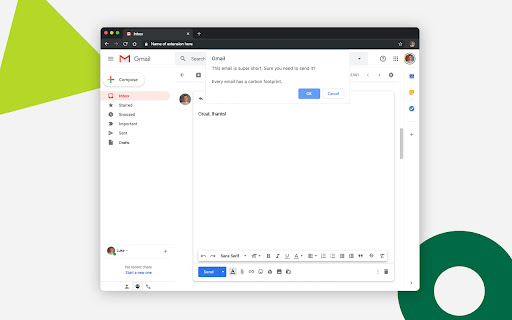

Take a mindful, carbon-saving pause before you hit send, with Carbon Capper for Chrome
Do you know every email we send contributes to the global carbon footprint? So if we all sent 1 less email per day we’d save over 16,433 tonnes of carbon a year. That’s why OVO’s launched its Carbon Capper. Download it for free and it’ll pop up every time you hit ‘send’ on an email with fewer than four words, prompting you to stop and think.
Emails will always beat letter-writing because we save paper, but this extension reminds us that our digital messaging habits have an impact too.
Let’s not get too heavy about this, it’s good to communicate. But, be honest, how many of the emails you ping off are essential, and how many are more ‘cute cat, LOOL’ or ‘brill, thanks again’? Rather than emailing a ‘thank you’ to someone sitting next to you, why not say it in person?We now know that spending hours online can damage our mental health – in the same way, too many emails can be a negative thing. Who doesn’t sigh when 50 unread messages pop up each time you open your inbox?
OVO’s Carbon Capper prompts a mindful pause before you send – to think about what we’re communicating and why – and the carbon impact it’ll have.
Find out more about why we created this extension here: https://www.ovoenergy.com/blog/ovo-news/think-before-you-thank
Download it today and help kick the carbon, one email at a time!
The Carbon Capper is only available on the latest version of Chrome. To update your browser, click the 'More' button in the top right of your Chrome window, select 'Update Google Chrome', and relaunch. If you don't see this option - you're all up to date.
| 分类 | 💬沟通 |
| 插件标识 | fhnhofnjjgdecmbjjjikhekdmepoejnk |
| 平台 | Chrome |
| 评分 |
☆☆☆☆☆
|
| 评分人数 | |
| 插件主页 | https://chromewebstore.google.com/detail/ovo-carbon-capper/fhnhofnjjgdecmbjjjikhekdmepoejnk |
| 版本号 | 88 |
| 大小 | 57.04KiB |
| 官网下载次数 | 177 |
| 下载地址 | |
| 更新时间 | 2019-11-22 00:00:00 |
CRX扩展文件安装方法
第1步: 打开Chrome浏览器的扩展程序
第2步:
在地址栏输入: chrome://extensions/
第3步: 开启右上角的【开发者模式】
第4步: 重启Chrome浏览器 (重要操作)
第5步: 重新打开扩展程序管理界面
第6步: 将下载的crx文件直接拖入页面完成安装
注意:请确保使用最新版本的Chrome浏览器