
Medium Next Generation Stats Chrome 插件, crx 扩展下载
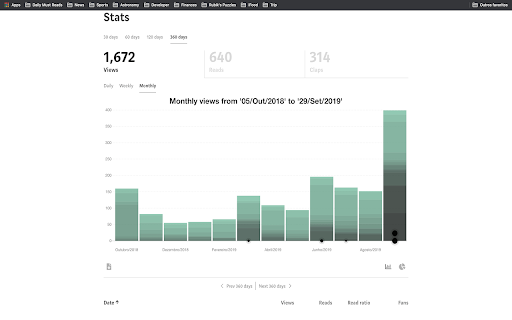
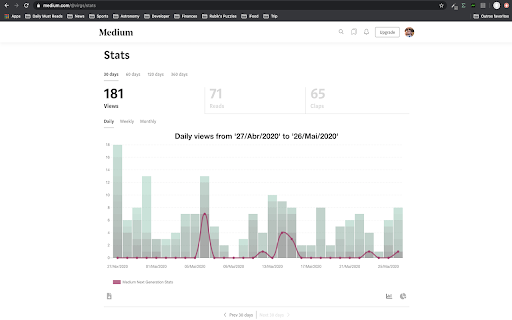
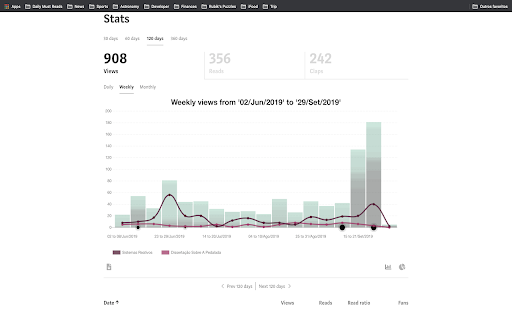
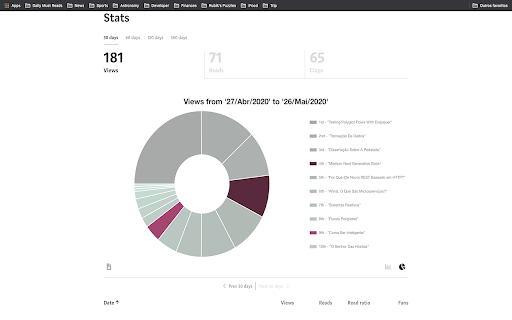
Take your medium text stats to the Next Generation
Take your medium text stats to the Next Generation and get rid of the old fashion dataless default medium.
Get larger time range, daily/weekly/monthly read/views/claps, and, specially, describes which article was view in which period.
Have fun!
### Features
- Highlight post/publication
- Different time ranges: 30/60/120/360/1800 days and current month
- Super cool and animated charts
- Top articles/publications read/viewed/upvotes/clapped/followed/earned in the time range
- Different ranges visualization: daily, weekly and monthly
- Download JSON and CSV files
### How to use
1. Go to your medium stats page: https://medium.com/me/stats
2. This is it
### Contact
Official website: https://virgs.me/mngs
Instagram: https://instagram.com/thevirgs
Medium: https://medium.com/@virgs
Github: https://github.com/virgs
Pagehub: https://pagehub.me/virgs
### Source Code
You can find the source code on the link below:
https://github.com/virgs/medium-next-gen-stats
### Development
1. Clone this repo
2. Go to chrome://extensions
3. Enable developer mode
4. Click on `load unpacked extension` and select the `medium-next-gen-stats` folder.
PRs are most welcome :)
### Acknowledgement
Thanks to @tomastrajan and @HcwXd for sharing their ideas and source code.
You made my life a lot easier.
| 分类 | 👥社交 |
| 插件标识 | fhopcbdfcaleefngfpglahlpfhagendo |
| 平台 | Chrome |
| 评分 |
☆☆☆☆☆
|
| 评分人数 | |
| 插件主页 | https://chromewebstore.google.com/detail/medium-next-generation-st/fhopcbdfcaleefngfpglahlpfhagendo |
| 版本号 | 3.128.4 |
| 大小 | 2.7MiB |
| 官网下载次数 | 311 |
| 下载地址 | |
| 更新时间 | 2021-11-02 00:00:00 |
CRX扩展文件安装方法
第1步: 打开Chrome浏览器的扩展程序
第2步:
在地址栏输入: chrome://extensions/
第3步: 开启右上角的【开发者模式】
第4步: 重启Chrome浏览器 (重要操作)
第5步: 重新打开扩展程序管理界面
第6步: 将下载的crx文件直接拖入页面完成安装
注意:请确保使用最新版本的Chrome浏览器