
JIRA Work Log Report Chrome 插件, crx 扩展下载
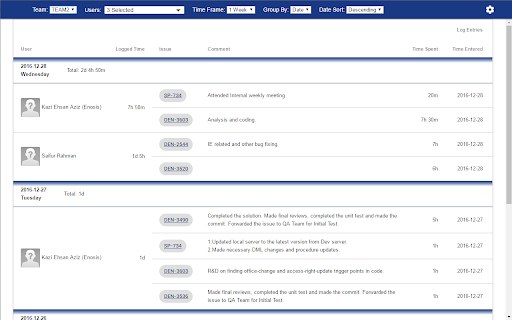
An extension that shows work log report. It fetches data from JIRA REST API.
An extension that shows JIRA work log report. It fetches data using JIRA REST API.
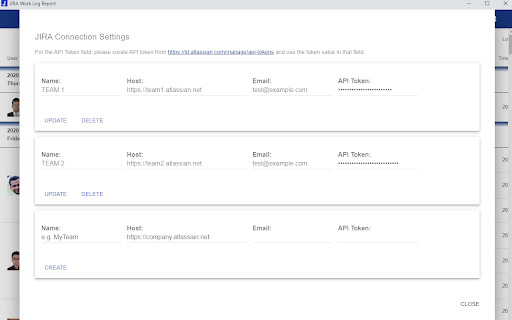
This extension calls JIRA REST API to get information on JIRA worklogs. For the extension to be able to call the APIs successfully, following information is collected from user explicitly in a form (in settings popup of the extensions page):
1. URL of the JIRA site (i.e. {account-domain}.atlassian.net).
2. User's JIRA account's email address.
3. An API token user creates in JIRA to be used in this extension.
The extension stores this information in browser (using localStorage). To fetch the work log information, the extension created the API URL
using the URL user provided, and passes the email/API token as base64 encoded standard Authorization Header (i.e. basic authentication).
The extension does not use the information user provides in any other way apart from what described above.
| 分类 | 📝工作流程与规划 |
| 插件标识 | fiflmfdkmjodhcppbeabhjdmljkifigf |
| 平台 | Chrome |
| 评分 |
☆☆☆☆☆
|
| 评分人数 | |
| 插件主页 | https://chromewebstore.google.com/detail/jira-work-log-report/fiflmfdkmjodhcppbeabhjdmljkifigf |
| 版本号 | 25.2.3.0 |
| 大小 | 91.88KiB |
| 官网下载次数 | 972 |
| 下载地址 | |
| 更新时间 | 2020-03-11 00:00:00 |
CRX扩展文件安装方法
第1步: 打开Chrome浏览器的扩展程序
第2步:
在地址栏输入: chrome://extensions/
第3步: 开启右上角的【开发者模式】
第4步: 重启Chrome浏览器 (重要操作)
第5步: 重新打开扩展程序管理界面
第6步: 将下载的crx文件直接拖入页面完成安装
注意:请确保使用最新版本的Chrome浏览器