
Simple Form Fill Chrome 插件, crx 扩展下载
Enter text into input fields by choosing items from the context menu or using the optional autocomplete.
Simple Form Fill
================
Enter text into input fields by choosing configured items from the context menu
or using the optional autocomplete (not autofill) which suggest items based on
typed input.
New items can be added through the context menu while having some text selected
or in the extension's preferences.
Screenshot Descriptions
-----------------------
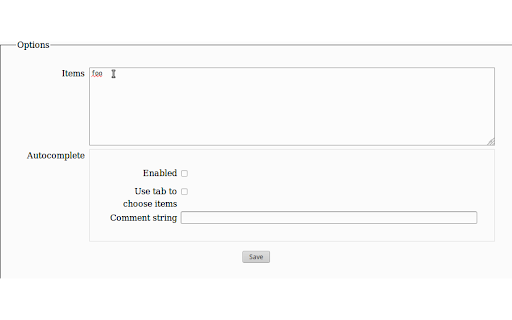
- Configure the items you can fill into text fields in the add-on preferences (get there directly by clicking the toolbar button or through the context menu)
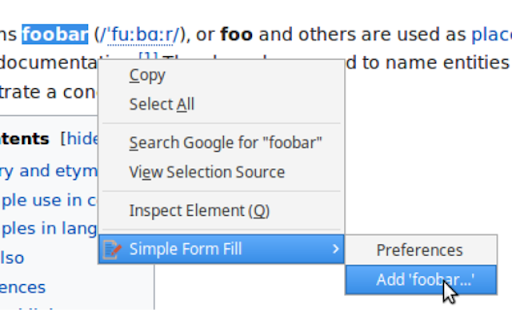
- Or add items from selected text using the context menu
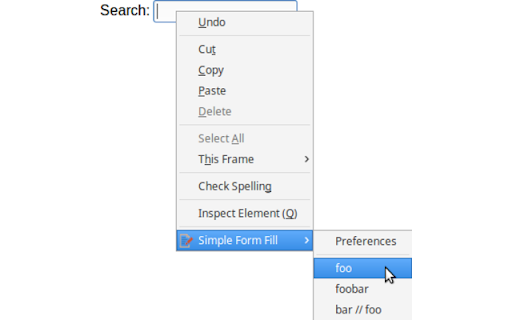
- Use the context menu on input fields to fill one of the configured items
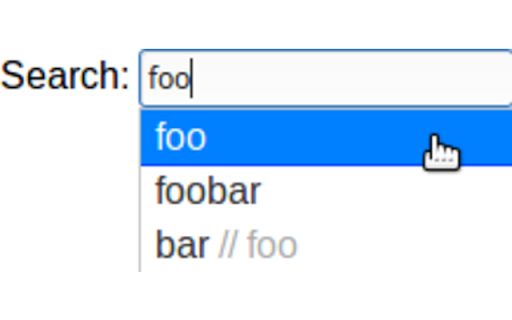
- Enable autocomplete in the preferences to get a list of matching items to choose from when typing in input fields. You can configure comments in the preferences - they are matched against but removed from the item before filling
Feedback
--------
You can report bugs or make feature requests on https://github.com/sblask/webextension-simple-form-fill
Patches are welcome.
| 分类 | 📝工作流程与规划 |
| 插件标识 | filmkodmbabpfkfhoekpgfpankdlajmf |
| 平台 | Chrome |
| 评分 |
☆☆☆☆☆
|
| 评分人数 | |
| 插件主页 | https://chromewebstore.google.com/detail/simple-form-fill/filmkodmbabpfkfhoekpgfpankdlajmf |
| 版本号 | 25.2.3.0 |
| 大小 | 248KiB |
| 官网下载次数 | 10000 |
| 下载地址 | |
| 更新时间 | 2021-03-28 00:00:00 |
CRX扩展文件安装方法
第1步: 打开Chrome浏览器的扩展程序
第2步:
在地址栏输入: chrome://extensions/
第3步: 开启右上角的【开发者模式】
第4步: 重启Chrome浏览器 (重要操作)
第5步: 重新打开扩展程序管理界面
第6步: 将下载的crx文件直接拖入页面完成安装
注意:请确保使用最新版本的Chrome浏览器