
Unimelb Timetable to iCal Chrome 插件, crx 扩展下载
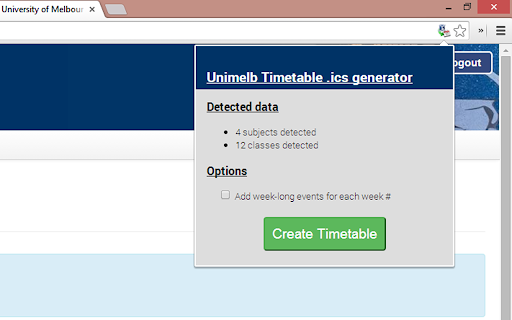
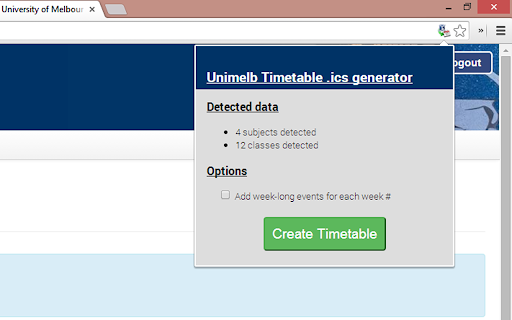
Converts the Unimelb timetable page into an iCal file
[Update - August 2019]
v1.2.0 has just been released which updates the semester break date to work properly for semester 2 2019 (see version history below for more info).
Chrome Extension that converts the University of Melbourne student timetable page into an iCalendar/.ics file, which you can then import into iCloud/Google Calendar/Outlook Calendar or any other calendar program that supports the iCal file format.
To use it: just go to the Student Portal and navigate to your timetable. A small icon will pop up in the toolbar - click that and you can probably work out the rest :)
Features:
* (NEW!) Fetches semester start/end dates automagically from the Unimelb academic calendar
* Scrapes all timetable data (subject code+name, times, location)
* Repeats timetable for duration of semester
* Excludes repeats from the mid-semester break
* Ability to include week-long events that are labelled with the University week # (plus one for the mid-semester break)
Please report any bugs on my GitHub repo: https://github.com/nuclearpidgeon/UoM-Timetable-to-iCal
Version history:
* v1.2.0 (August 2019) - update the semester break date for semester 1 2019, and add an automatic semester selection (based on which one starts closest to the current date)
* v1.1.5 (February 2018) - update the semester break date for semester 1 2018
* v1.1.4 (August 2017) - fix date fetching issues with the new Unimelb calendar page (worst 'API' ever!)
| 分类 | 📝工作流程与规划 |
| 插件标识 | fjebhipnmjbnhfhcpoajoaembenmnllm |
| 平台 | Chrome |
| 评分 |
☆☆☆☆☆
|
| 评分人数 | |
| 插件主页 | https://chromewebstore.google.com/detail/unimelb-timetable-to-ical/fjebhipnmjbnhfhcpoajoaembenmnllm |
| 版本号 | 25.2.3.0 |
| 大小 | 82.53KiB |
| 官网下载次数 | 499 |
| 下载地址 | |
| 更新时间 | 2019-08-01 00:00:00 |
CRX扩展文件安装方法
第1步: 打开Chrome浏览器的扩展程序
第2步:
在地址栏输入: chrome://extensions/
第3步: 开启右上角的【开发者模式】
第4步: 重启Chrome浏览器 (重要操作)
第5步: 重新打开扩展程序管理界面
第6步: 将下载的crx文件直接拖入页面完成安装
注意:请确保使用最新版本的Chrome浏览器