
Browser timer alert Chrome 插件, crx 扩展下载

Place a timer alert on a tab, very useful of you want to return to a tab after a specific number of seconds.
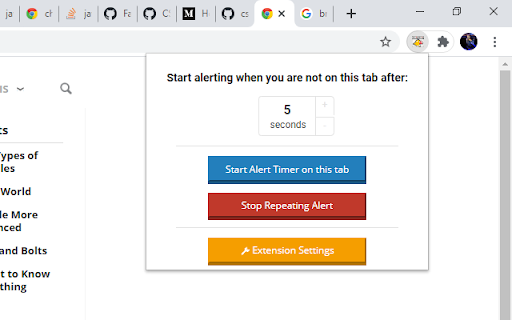
This extension is designed to help you know when you have to return to a tab, after a specific time of inactivity, setting the amount of inactivity time and the timer is done from the extension button.
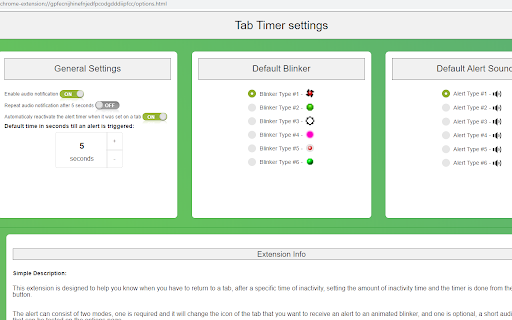
The alert can consist of two modes, one is required and it will change the icon of the tab that you want to receive an alert to an animated blinker, and one is optional, a short audio notification that can be tested on the options page.
With this extension you can place an alert timer on any tab you want and after you leave the tab the timer will trigger and when the timer will reach 0 seconds it will fire an alert.
This extension can be used in scenarios like this:
• an online exam when you have to return to a tab in x seconds
• waiting for a download link to be prepared
• in case of remote work when you need to check a tab frequently
With the default setting the alert will be reactivated on the same tab after you leave that tab, if you want to be alerted only once change the settings.
It works with multiple tabs but is not recommended to set on many tabs especially using audio it may be confusing.
??????? ??????:
• This extension does not collect any data form your device.
• This extension does not use external files, everything is packed into the extension.
• These are the permissions from extension manifest: ["activeTab", "declarativeContent", "storage", "webRequest", "webRequestBlocking", "<all_urls>;", "http://*/*", "https://*/*"], these permissions are necessary in order to perform the alerting on a specific tab.
• If you encounter any bugs please send me an email with the description of the bug, and I'll try to fix the bug
• This extension is completely open source, the source is available on my Gitlab - https://gitlab.flashsoft.eu
???????:
You can contact me using my website at https://flashsoft.eu.
| 分类 | 📝工作流程与规划 |
| 插件标识 | fnaaphnopbacdnekofacnlhablgmmfki |
| 平台 | Chrome |
| 评分 |
☆☆☆☆☆
|
| 评分人数 | |
| 插件主页 | https://chromewebstore.google.com/detail/browser-timer-alert/fnaaphnopbacdnekofacnlhablgmmfki |
| 版本号 | 25.2.3.0 |
| 大小 | 559KiB |
| 官网下载次数 | 137 |
| 下载地址 | |
| 更新时间 | 2023-03-14 00:00:00 |
CRX扩展文件安装方法
第1步: 打开Chrome浏览器的扩展程序
第2步:
在地址栏输入: chrome://extensions/
第3步: 开启右上角的【开发者模式】
第4步: 重启Chrome浏览器 (重要操作)
第5步: 重新打开扩展程序管理界面
第6步: 将下载的crx文件直接拖入页面完成安装
注意:请确保使用最新版本的Chrome浏览器