
Youtube™ Shortcuts Chrome 插件, crx 扩展下载
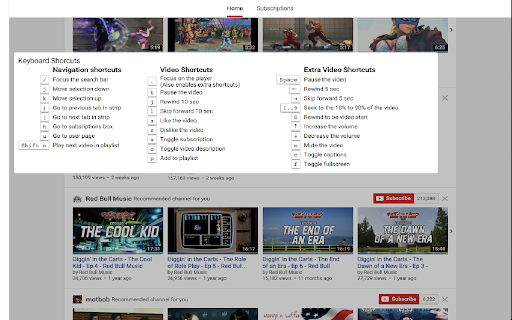
Focus on the Youtube player with a the press of a button
A collection of keyboard shortcuts for YouTube to make navigation faster.
Show shortcut - Shift + /
Default Shortcuts:
Focus on the player - "." (dot/period)
Unfocus the current element - "Esc"
Go to subscription box - "H"
Go to user profile - "U"
Navigate video list - "J" & "K"
Navigate tab strip - "[ & ]"
Follow link to new tab - "Shift + Enter"
Like the video - "A"
Dislike the video - "Z"
Subscribe - "S"
Add to playlist - "P"
Expand video description - "O"
Source Code:
https://github.com/danhp/youtube-shortcuts
| 分类 | 📝工作流程与规划 |
| 插件标识 | fnapinimcdpmgkedhjbfckmpjppnbhba |
| 平台 | Chrome |
| 评分 |
☆☆☆☆☆
|
| 评分人数 | |
| 插件主页 | https://chromewebstore.google.com/detail/youtube-shortcuts/fnapinimcdpmgkedhjbfckmpjppnbhba |
| 版本号 | 1.7.2 |
| 大小 | 68.71KiB |
| 官网下载次数 | 590 |
| 下载地址 | |
| 更新时间 | 2019-11-20 00:00:00 |
CRX扩展文件安装方法
第1步: 打开Chrome浏览器的扩展程序
第2步:
在地址栏输入: chrome://extensions/
第3步: 开启右上角的【开发者模式】
第4步: 重启Chrome浏览器 (重要操作)
第5步: 重新打开扩展程序管理界面
第6步: 将下载的crx文件直接拖入页面完成安装
注意:请确保使用最新版本的Chrome浏览器