
Walmart Auto Fill Address Chrome 插件, crx 扩展下载
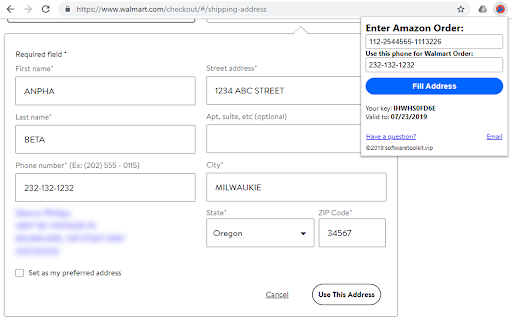
Auto fill Amazon Order's address to Walmart Order
If you are a drop shipper from Amazon (any Amazon Marketplace) to Walmart then this tool is for you.
★ What does this tool do?
Given an Amazon Order, this tool will fill the shipping address on your Walmart order automatically.
★ Speed up your dropship process
Only one step: paste your amazon order into this tool then all shipping address is filled automatically and accurately.
★ For All Sellers, For Most Marketplaces
It works with all marketplaces that Walmart can ship.
★ Keep Your Data Private
No Amazon MWS access is required, just be logged into Seller Central when you use the extension.
★ is this tool free?
Yes. You can use this forever if you like. A small donate money is appreciated!
Note: You should be logged into Seller Central with a user that has the “Manage Orders” permissions.
Contact us at softwaretoolkit.vip, or reach out to us on
Facebook: https://www.facebook.com/amz.tools.1
Join our support group on Facebook! https://www.facebook.com/groups/354030888636529/
| 分类 | 📝工作流程与规划 |
| 插件标识 | fnbacieeoapeoiblgfkhhmndhiaiokif |
| 平台 | Chrome |
| 评分 |
☆☆☆☆☆
|
| 评分人数 | |
| 插件主页 | https://chromewebstore.google.com/detail/walmart-auto-fill-address/fnbacieeoapeoiblgfkhhmndhiaiokif |
| 版本号 | 1.4.1 |
| 大小 | 116KiB |
| 官网下载次数 | 101 |
| 下载地址 | |
| 更新时间 | 2021-11-10 00:00:00 |
CRX扩展文件安装方法
第1步: 打开Chrome浏览器的扩展程序
第2步:
在地址栏输入: chrome://extensions/
第3步: 开启右上角的【开发者模式】
第4步: 重启Chrome浏览器 (重要操作)
第5步: 重新打开扩展程序管理界面
第6步: 将下载的crx文件直接拖入页面完成安装
注意:请确保使用最新版本的Chrome浏览器