
muAnalytics for Google Analytics (tm) Chrome 插件, crx 扩展下载
Get Google Analytics(tm) data right in your browser
muAnalytics for Google Analytics (tm).
Bird’s Eye view of your google Analytics statistics.
The app will ask you fot authorization to access you google analytics data.
1. Select account
Choose Google Analytics™ account for which you want to display statistics.
2. Select analysis period
-------------------------------------------------------
Coming soon
-------------------------------------------------------
- Feel free to ask what you needs in the comments.
-------------------------------------------------------
Changelog
-------------------------------------------------------
1.4.2: 2017-12-20
- new: Icon counter is updated when favorite site changes
- fix: Icon counter shows "*k+, **k+ or ***k+" for site with more than 999, 9999 and 99999 visits
1.4.1: 2017-09-14
- new: Last period selected is used when opening the popup
- fix Today'sessions for favorite property on extension icon still didn't update
1.4.0: 2017-09-08
- new link available (bars) for each properties to direct access Google Analytics report page
- fix Today'sessions for favorite property on extension icon didn't update (now each 10 minutes)
1.3.0: 2017-09-07
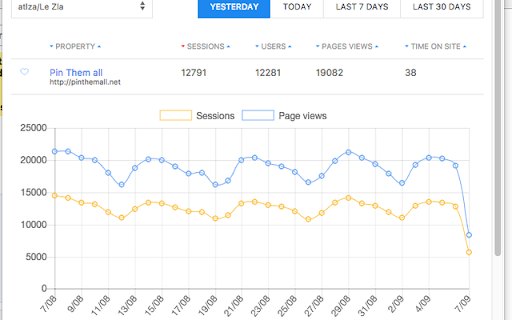
- A click on property name shows graph with last month's sessions and pageviews
- Fix inversion between users and sessions in table
- Fix Today'sessions for favorite property on extension icon
1.2.1: 2017-08-31
- Fix bug for account with large number of properties
1.2.0: 2017-08-30
- Adding Google Analytics tracking events
- Adding possibility to sort table by properties name, users, sessions, page views or time on site.
1.1.0: 2017-08-29
- You can fave a property to see its todays' sessions on the extension icon (updated each 15 minutes)
1.0.0: 2017-08-28
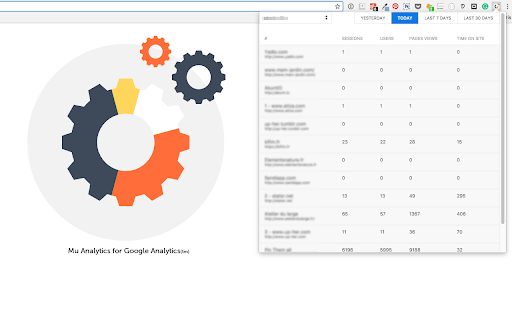
- Shows Users, sessions, pages views, Average time on site (in seconds) for each properties in account
- Switch account
- Select period: Yesterday, today, last 7 days, last 30 days
-------------------------------------------------------
Please note
-------------------------------------------------------
An account may not load if you are using others statistics app, as each GA user has a quota of call available each second.
| 分类 | 💻开发者工具 |
| 插件标识 | fnfojiifebglbgdglkcpajlegebboaik |
| 平台 | Chrome |
| 评分 |
☆☆☆☆☆
|
| 评分人数 | |
| 插件主页 | https://chromewebstore.google.com/detail/muanalytics-for-google-an/fnfojiifebglbgdglkcpajlegebboaik |
| 版本号 | 8.3 |
| 大小 | 525KiB |
| 官网下载次数 | 29 |
| 下载地址 | |
| 更新时间 | 2017-12-20 00:00:00 |
CRX扩展文件安装方法
第1步: 打开Chrome浏览器的扩展程序
第2步:
在地址栏输入: chrome://extensions/
第3步: 开启右上角的【开发者模式】
第4步: 重启Chrome浏览器 (重要操作)
第5步: 重新打开扩展程序管理界面
第6步: 将下载的crx文件直接拖入页面完成安装
注意:请确保使用最新版本的Chrome浏览器