
VinSolutions Token Support in Template Links Chrome 插件, crx 扩展下载
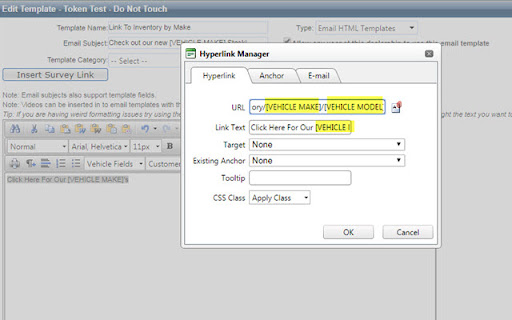
Use Vin Tokens in Hyperlinks in Email Templates in VinSolutions CRM.
vinsolutions CRM only.
If you need to use Vin Tokens in hyperlinks in Email Templates you will need to use this Extension when Editing or Adding Templates.
Currently VinSolution's template editor will encode all special characters in the URL of a hyperlink. This is 100% compliant with web standards and normal. However, this causes Vin Tokens IN a hyperlink to break as the Token contains characters necessary to encode to create a valid URL. In order for Vin Tokens to work in hyperlinks those characters must be decoded back to their normal state. This will allow VinSolutions to save the hyperlink with the inserted Tokens then replace with customer specific information once a template is loaded from a customer dashboard.
Example of Usage: A dealer may want to link to their Corvette Inventory in an email if the customer’s Primary Vehicle attached to the lead is a Corvette using the [VEHICLE MAKE] token in a URL.
Directions
Simply install and then Edit email template. Plugin will work in background.
| 分类 | ♿无障碍访问 |
| 插件标识 | fnjgpmklmeoocndimkdahhbfhlhnpemj |
| 平台 | Chrome |
| 评分 |
☆☆☆☆☆
|
| 评分人数 | |
| 插件主页 | https://chromewebstore.google.com/detail/vinsolutions-token-suppor/fnjgpmklmeoocndimkdahhbfhlhnpemj |
| 版本号 | 2.19.1 |
| 大小 | 3.33KiB |
| 官网下载次数 | 20 |
| 下载地址 | |
| 更新时间 | 2019-05-09 00:00:00 |
CRX扩展文件安装方法
第1步: 打开Chrome浏览器的扩展程序
第2步:
在地址栏输入: chrome://extensions/
第3步: 开启右上角的【开发者模式】
第4步: 重启Chrome浏览器 (重要操作)
第5步: 重新打开扩展程序管理界面
第6步: 将下载的crx文件直接拖入页面完成安装
注意:请确保使用最新版本的Chrome浏览器