
Web Secure Plus Chrome 插件, crx 扩展下载

Get Secure Search Results Instantly
Get Secure Search Results Instantly
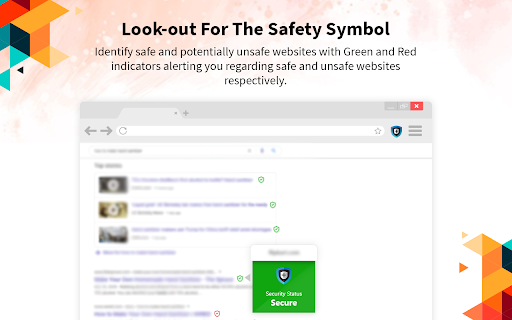
Embrace the advanced security on your search result page by checking and knowing the safety indicators against each website to avoid landing on a malicious and harmful website.
Download “Web Secure Plus” extension on your Chrome browser to get protected on the go.
Features
- Advanced security against potentially malicious websites.
- Whistleblower for your safety against threats & infections.
- Completely FREE for lifetime.
- Intuitive interface that is easy-to-use for everyone.
How to use Web Secure Plus?
Once you install Web Secure Plus Extension on your Chrome browser, use it with the below steps:
1. Search for a term/keyword from your browser's search bar.
2. Find the safety indicators on your search result page.
Note:
The Green symbol defines a secure webpage to visit.
The Red symbol warns against a potential threat on a website.
It is important to know that we access your search term and share it with our third-party service provider that works in the background. It is completely up to our service provider which search engine it uses to show your results.
If you have any queries, suggestions, or feedback, please contact us and help us improve our services for you.
Upon clicking the 'Add to Chrome' button, you confirm your agreement to install this Chrome™ extension and abide by the EULA & Privacy Policy. Web Secure Plus will set your default search provider to websecureplus.com
Chrome is a trademark of Google LLC. The use of it here does not imply any affiliation with or endorsement by Google LLC.
Privacy Policy - https://www.websecureplus.com/privacy-policy/
EULA - https://www.websecureplus.com/eula/
| 分类 | 🛠️工具 |
| 插件标识 | fphgolmhjdbiohjkkfimdbjjhbmndegm |
| 平台 | Chrome |
| 评分 |
☆☆☆☆☆
|
| 评分人数 | |
| 插件主页 | https://chromewebstore.google.com/detail/web-secure-plus/fphgolmhjdbiohjkkfimdbjjhbmndegm |
| 版本号 | 29.0 |
| 大小 | 277KiB |
| 官网下载次数 | 365 |
| 下载地址 | |
| 更新时间 | 2020-05-04 00:00:00 |
CRX扩展文件安装方法
第1步: 打开Chrome浏览器的扩展程序
第2步:
在地址栏输入: chrome://extensions/
第3步: 开启右上角的【开发者模式】
第4步: 重启Chrome浏览器 (重要操作)
第5步: 重新打开扩展程序管理界面
第6步: 将下载的crx文件直接拖入页面完成安装
注意:请确保使用最新版本的Chrome浏览器