
My Tabs List Chrome 插件, crx 扩展下载
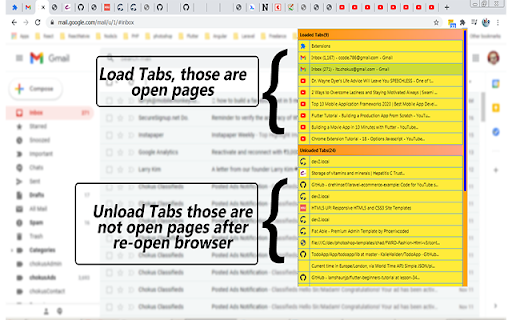
Quick Open tab from open multiple tabs through My Tabs List Extenstion
"My Tabs List"
Quick Open Particular Tab from My Tabs List Extension when Open multiple Tabs of chrome web browser windows.
Very Light weight Extension.
"Listing All Open Tabs"
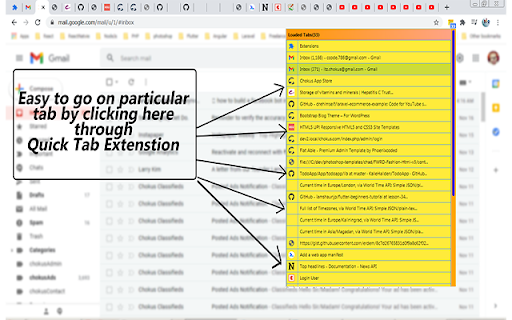
- Listing all tabs with Title so that you can open exact tab. You don't have to go through all tabs for looking particular tab. Mostly when we open browser next time with multiple tabs then we have to face open particular tab, for that we look tab one by one which take time and loading tabs again as well as reducing internet speed.
- Also this extension give you list of open tabs so that you can know about open multiple tabs.
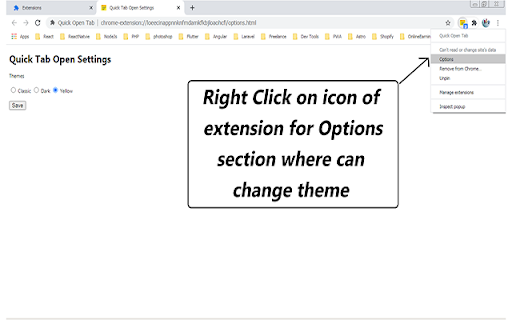
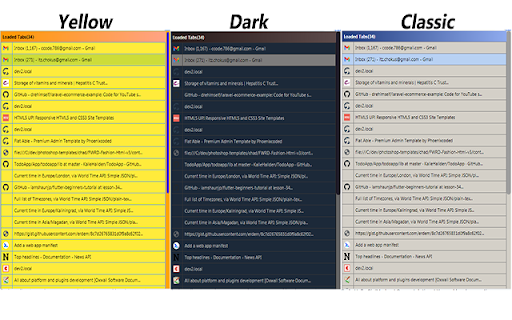
Themes
There's themes where you can change according to as you like...
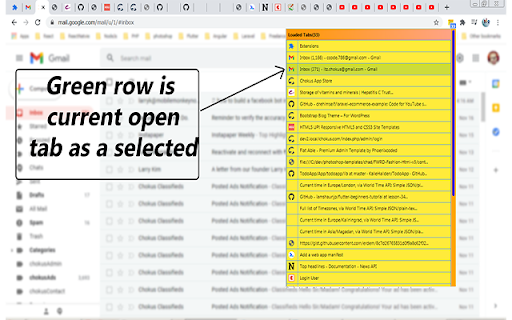
- Listing open Tabs
- Listing tabs with Title
- Quick/Switch tab by click
- Change Theme
| 分类 | 💻开发者工具 |
| 插件标识 | gabglhlfcmjkdgkicegpofhhcncbgohh |
| 平台 | Chrome |
| 评分 |
☆☆☆☆☆
|
| 评分人数 | |
| 插件主页 | https://chromewebstore.google.com/detail/my-tabs-list/gabglhlfcmjkdgkicegpofhhcncbgohh |
| 版本号 | 2.7.0.0 |
| 大小 | 61.93KiB |
| 官网下载次数 | 32 |
| 下载地址 | |
| 更新时间 | 2020-11-26 00:00:00 |
CRX扩展文件安装方法
第1步: 打开Chrome浏览器的扩展程序
第2步:
在地址栏输入: chrome://extensions/
第3步: 开启右上角的【开发者模式】
第4步: 重启Chrome浏览器 (重要操作)
第5步: 重新打开扩展程序管理界面
第6步: 将下载的crx文件直接拖入页面完成安装
注意:请确保使用最新版本的Chrome浏览器