
GreenRope Chrome 插件, crx 扩展下载
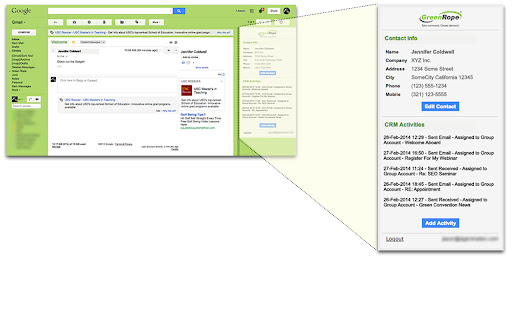
The GreenRope Gmail Gadget is an extension that you can use while working in Gmail.
GreenRope is the world's first and only Complete CRM - an integrated platform for Customer Relationship Management and Marketing Automation.
The GreenRope Gmail Gadget is an extension that you can use while working in Gmail to view a contact's information, as well as all of their CRM activity from GreenRope.
• Pulls up all CRM Activities with that contact
• Add new CRM activities and engagements
• Add a new contact to your GreenRope CRM right from Gmail
• View contact information and details
• Edit your contact's information
GreenRope gives you the ability to manage sales, marketing, and operations in a single platform and includes:
- Contact management
- Unlimited customizable CRM activities and workflows
- Integration with IMAP so your emails automatically synch with your CRM
- Full-featured email marketing with templates, personalization, responsive design, and more
- Detailed email tracking, showing summary and detailed reads, clicks, forwards, unsubscribes, and bounces
- Surveys with logic, custom assessment, and automation
- SMS and mobile marketing
- In- and out-bound call management with automatic CRM integration
- Full website CMS with integrated storefront (accept payments through Paypal and/or Authorize.net)
- Website form builder with auto-responders, logic, and custom field entry
- Website tracking, including time spent on pages, bounce rates, campaign filtering
- Ticketing / case management system
- Project management
- Wiki for a knowledge management
- Media library for file, image, and video storage, with sharing across multiple groups
- Realtime social collaboration dashboard
and much, much more.
| 分类 | 📝工作流程与规划 |
| 插件标识 | gdggbbgopaoibfblomgfcppbfagegfdg |
| 平台 | Chrome |
| 评分 |
☆☆☆☆☆
|
| 评分人数 | |
| 插件主页 | https://chromewebstore.google.com/detail/greenrope/gdggbbgopaoibfblomgfcppbfagegfdg |
| 版本号 | 25.2.3.0 |
| 大小 | 90.06KiB |
| 官网下载次数 | 45 |
| 下载地址 | |
| 更新时间 | 2019-02-16 00:00:00 |
CRX扩展文件安装方法
第1步: 打开Chrome浏览器的扩展程序
第2步:
在地址栏输入: chrome://extensions/
第3步: 开启右上角的【开发者模式】
第4步: 重启Chrome浏览器 (重要操作)
第5步: 重新打开扩展程序管理界面
第6步: 将下载的crx文件直接拖入页面完成安装
注意:请确保使用最新版本的Chrome浏览器