
Gooder Bitbucket PRs Chrome 插件, crx 扩展下载
Bring some goodness to Bitbucket Cloud PRs!
This extension adds some polish to Bitbucket Cloud PRs, to help make your PR life easier.
[ OVERVIEW ]
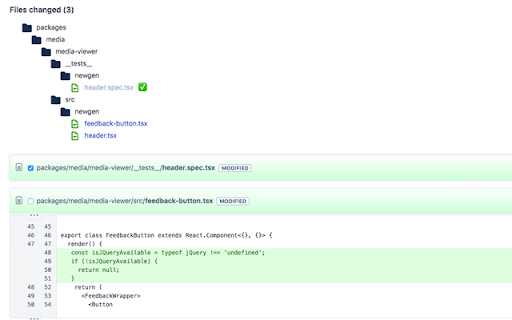
* Convert file list to tree view
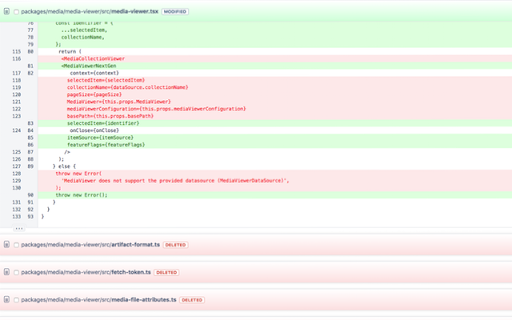
* Apply color styling to file diffs
* Remove ins/del -/+ gutter characters
* Expand / Collapse files (OPTION-CLICK to toggle all)
* Collapse DELETED files by default
* Collapse lock files by default (package-json.js, yarn.lock)
* Make file headers sticky to help with long files
* Mark files as done via checkbox to keep track of reviewed/unreviewed files (OPTION-CLICK to mark all)
* Hide/Show comments to help view changes and reduce review noise
* Hide/Show deletions to help view only additive changes
[ KEYBOARD SHORTCUTS ]
* COMMAND + "/" (for windows use WINDOWS KEY + "/") to jump to top of file tree.
* COMMAND + ENTER ( for windows use WINDOWS KEY + ENTER) to jump to next unreviewed file.
* OPTION-Click file headers to toggle expand/collapse all
* OPTION-Click file header checkboxes to toggle review/un-reviewed all
Enjoy!
-------------------------------------------------------------
[ CHANGESET ]
v1.3.0:
* performance improvements (switch from polling DOM to MutationObservers)
* enhance review workflow - OPTION+Click checkboxes for all
* auto-collapse large lock files
* auto jump to tree after checking file as reviewed
v1.2.0:
* add support for merge conflicts
v1.1.1:
* replace -|+ gutters with space rather than empty string, was causing indentation problems
* add two new options to bottom of tree:
* Hide Comments ~ hide all comments temporarily so you can just focus on changes
* Hide Deletions ~ hide all deleted files and deletion areas in diff, useful for just focussing on whats added
* Updated key mappings:
* Option + Click file header to toggle all (was SHIFT previously but caused text selection weirdness)
* Command + "/" (forward slash) to jump to top of tree (was Command + HOME previously but better for laptop keyboards this way)
| 分类 | 💻开发者工具 |
| 插件标识 | gdkiikbhokcgaofkkjinfilmachkkhen |
| 平台 | Chrome |
| 评分 |
☆☆☆☆☆
|
| 评分人数 | |
| 插件主页 | https://chromewebstore.google.com/detail/gooder-bitbucket-prs/gdkiikbhokcgaofkkjinfilmachkkhen |
| 版本号 | 8.3 |
| 大小 | 34.2KiB |
| 官网下载次数 | 13 |
| 下载地址 | |
| 更新时间 | 2018-08-31 00:00:00 |
CRX扩展文件安装方法
第1步: 打开Chrome浏览器的扩展程序
第2步:
在地址栏输入: chrome://extensions/
第3步: 开启右上角的【开发者模式】
第4步: 重启Chrome浏览器 (重要操作)
第5步: 重新打开扩展程序管理界面
第6步: 将下载的crx文件直接拖入页面完成安装
注意:请确保使用最新版本的Chrome浏览器