
Web Dev Kit Chrome 插件, crx 扩展下载


Tools to facilitate web development
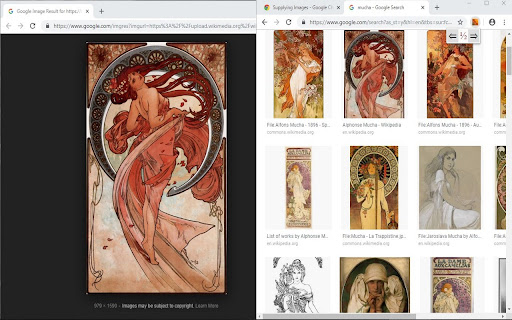
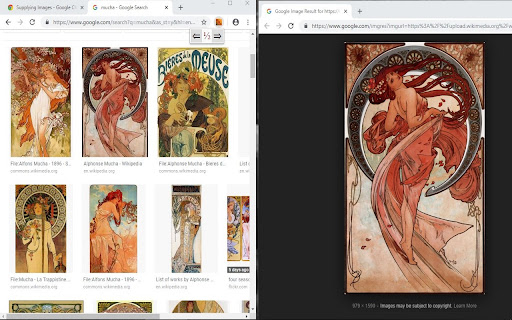
Every browser window can of course be minimized, maximized and restored down to its previous size. Web Dev Kit augments those native options with two more (so far): dock in either the left or right half of the screen (I intend to expand these options soon). Great for web development or coding along to tutorials!
Just click the icon to open the menu and then click the left or right arrow!
Currently there are no options and no special permissions are required.
Promotional art includes laptop image (minus screen image and shadow) and Stout Scarab image by Pixabay users janjf93 and Mark Thomas, respectively. All other elements either public domain or original.
This is an open source project and you can see the code and file issues here:
https://github.com/jamessouth/webdevkit
Thank you!
| 分类 | 💻开发者工具 |
| 插件标识 | geedfiohcopjhgancckdfanhobhfbgmm |
| 平台 | Chrome |
| 评分 |
☆☆☆☆☆
|
| 评分人数 | |
| 插件主页 | https://chromewebstore.google.com/detail/web-dev-kit/geedfiohcopjhgancckdfanhobhfbgmm |
| 版本号 | 5.24.8 |
| 大小 | 29.1KiB |
| 官网下载次数 | 42 |
| 下载地址 | |
| 更新时间 | 2019-05-11 00:00:00 |
CRX扩展文件安装方法
第1步: 打开Chrome浏览器的扩展程序
第2步:
在地址栏输入: chrome://extensions/
第3步: 开启右上角的【开发者模式】
第4步: 重启Chrome浏览器 (重要操作)
第5步: 重新打开扩展程序管理界面
第6步: 将下载的crx文件直接拖入页面完成安装
注意:请确保使用最新版本的Chrome浏览器