
MAL HoverInfo Chrome 插件, crx 扩展下载

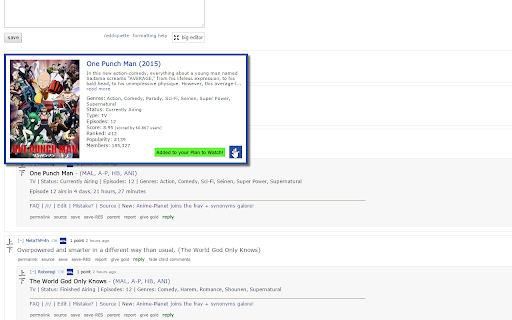
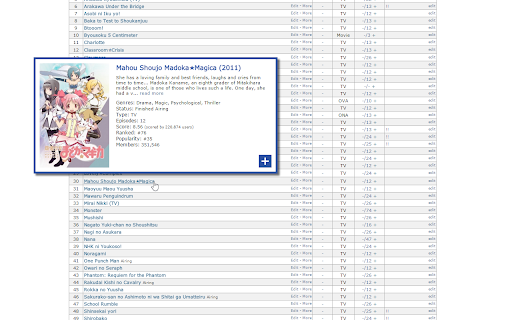
Show a popup when hovering over MyAnimeList links displaying info about the anime with a button to add it to your Plan to Watch list
A handy extension for people who search for new manga/anime to watch/read on the internet. This extension displays information from MyAnimeList when you hover over an anime link. Simply hover over the http://myanimelist.net link on any webpage and a helpful popup will appear displaying information about the anime/manga.
This is also helpful for those who have tons of anime on their Plan to Watch list and can't remember what each of them was about. Now instead of painfully clicking through each one of them, simply hover over them and refresh your memory with the image and description.
On top of the information this extension displays, you can also add anime/manga to your Plan to Watch/Read list, straight from the popup!
Firefox version:
https://addons.mozilla.org/en-US/firefox/addon/mal-hoverinfo/
Source code:
https://bitbucket.org/Rivenation/mal-hoverinfo/
| 分类 | ♿无障碍访问 |
| 插件标识 | genfpdnjjiipamobbdidnilpfgejfpeo |
| 平台 | Chrome |
| 评分 |
☆☆☆☆☆
|
| 评分人数 | |
| 插件主页 | https://chromewebstore.google.com/detail/mal-hoverinfo/genfpdnjjiipamobbdidnilpfgejfpeo |
| 版本号 | 2.6 |
| 大小 | 72.85KiB |
| 官网下载次数 | 486 |
| 下载地址 | |
| 更新时间 | 2016-09-04 00:00:00 |
CRX扩展文件安装方法
第1步: 打开Chrome浏览器的扩展程序
第2步:
在地址栏输入: chrome://extensions/
第3步: 开启右上角的【开发者模式】
第4步: 重启Chrome浏览器 (重要操作)
第5步: 重新打开扩展程序管理界面
第6步: 将下载的crx文件直接拖入页面完成安装
注意:请确保使用最新版本的Chrome浏览器