
Exam Room - Block website during exam Chrome 插件, crx 扩展下载
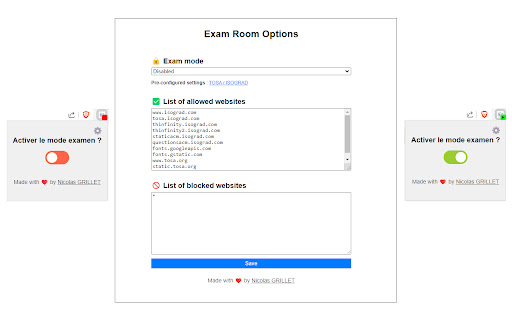
Activate an exam environment and block/allow specific websites
The "Exam Room" extension for Google Chrome is designed to create a secure and controlled environment during online exams, such as TOSA / ISOGRAD certifications. This extension is ideal for students, teachers, and educational institutions who want to ensure integrity and focus during online tests. By using this extension, you can easily block access to certain websites while allowing those necessary to take the exam.
Key Features:
Activation of Exam Environment:
A simple click on the "Launch Exam Room" button activates exam mode. In this mode, only authorized websites are accessible, thus blocking any potential distractions.
Management of Allowed and Blocked Websites:
Create customized lists of allowed and blocked websites. You can easily add or remove sites from these lists to suit each exam.
Simple and Intuitive Interface:
The extension offers a user-friendly interface with clearly defined options. The options page allows you to configure your preferences in a few clicks.
Easy Activation/Deactivation:
Easily switch between enabled and disabled modes for full control over website access during exams.
Preconfigured Settings:
Use preconfigured settings for quick and effective setup. Ideal for users who want to start quickly without delving into technical details.
Updates and Support:
Benefit from regular updates that add new features and improvements. Additionally, user support is available to answer your questions and resolve any issues.
Benefits of the Extension:
Improved Concentration:
By blocking distracting sites, students can fully concentrate on their exams, which can improve their performance.
Exam Integrity:
Ensure exams are taken honestly and without cheating by limiting access to unauthorized resources.
Ease of Use:
The extension is easy to install and use, with an intuitive user interface that requires no special technical skills.
Free of Charge:
Download and use the extension for free. We believe that access to quality educational tools should not be limited by fees.
Why Download "Exam Room"?
Secure your online exams.
Increase productivity and student performance.
Enjoy a free and easy-to-use solution.
Download the "Exam Room" extension now on the Chrome Web Store and transform your online exam experience by ensuring a more secure and focused environment.
| 分类 | 📝工作流程与规划 |
| 插件标识 | gfceeghcoekcmlpgonlplkpmakdmpgmg |
| 平台 | Chrome |
| 评分 |
★★★★☆
4.7
|
| 评分人数 | 7 |
| 插件主页 | https://chromewebstore.google.com/detail/exam-room-block-website-d/gfceeghcoekcmlpgonlplkpmakdmpgmg |
| 版本号 | 1.6.2 |
| 大小 | 22.32KiB |
| 官网下载次数 | 2000 |
| 下载地址 | |
| 更新时间 | 2024-07-11 00:00:00 |
CRX扩展文件安装方法
第1步: 打开Chrome浏览器的扩展程序
第2步:
在地址栏输入: chrome://extensions/
第3步: 开启右上角的【开发者模式】
第4步: 重启Chrome浏览器 (重要操作)
第5步: 重新打开扩展程序管理界面
第6步: 将下载的crx文件直接拖入页面完成安装
注意:请确保使用最新版本的Chrome浏览器
同类插件推荐

Think Exam
Capture full-screen on thinkexam test panel
Productivity Pigeon
Block sites simply!Block sites simply! An open sou

AI-Proctor
This is the chrome extention for the AI-Proctor sy
Exam Room - Block website during exam
Activate an exam environment and block/allow speci

prajnAM - Screen Capturing
This extension is used for auto invigilation of re

Screen Sharing for mywebinar.me
Share your screen for mywebinar.me

WebConnect Screenshare Extension
WebConnect Screenshare ExtensionShare your screen

Education Bhaskar
Education Bhaskar provides Dainik India Education

ABTasty
ABTasty extensionThe ABTasty extension let you man

Screensharing
Chrome extension for screen sharing

POCU Proctor
POCU ProctorPOCU Proctor This extension enables P

倍速 加速器
倍速 加速器 - Video speed controller for online videos.