
FusionPBX SelectToCall Chrome 插件, crx 扩展下载

Select phone numbers and right click to call
Implements a FusionPBX specific 'Select to Call' for phone numbers.
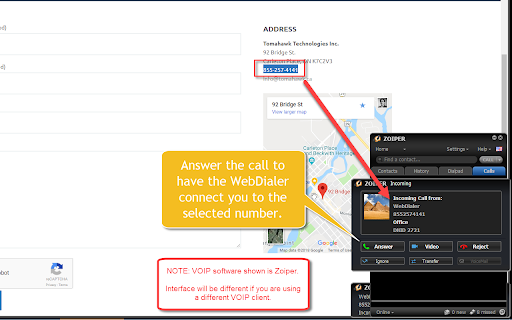
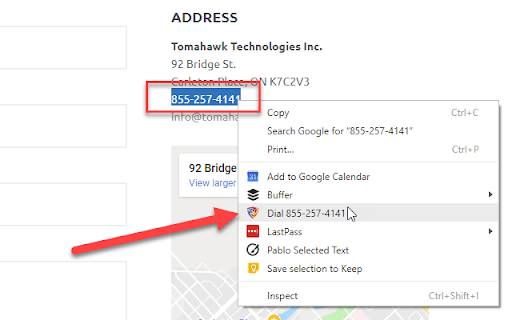
If you are using the FusionPBX server for VOIP calling, this extension allows you to simply select any phone number on a browsed web page. Then after a right click it adds "Dial <phone number>" to the context menu.
Upon selecting the option, the phone number is passed to your VOIP extension which rings. Once you answer the ringing phone the PBX will call the clicked number for you.
The code is released under a BSD license and all code is available.
Updates:
March 2019 - changed option auto-answer=true
November 2020 - added auto-answer as config option
Source code is here:
https://github.com/gizmobin/FusionPBX-SelectToCall
| 分类 | 📝工作流程与规划 |
| 插件标识 | ghcmfikimieoeehcbgbdeegkgmpaihgg |
| 平台 | Chrome |
| 评分 |
☆☆☆☆☆
|
| 评分人数 | |
| 插件主页 | https://chromewebstore.google.com/detail/fusionpbx-selecttocall/ghcmfikimieoeehcbgbdeegkgmpaihgg |
| 版本号 | 25.2.3.0 |
| 大小 | 38.72KiB |
| 官网下载次数 | 597 |
| 下载地址 | |
| 更新时间 | 2020-11-20 00:00:00 |
CRX扩展文件安装方法
第1步: 打开Chrome浏览器的扩展程序
第2步:
在地址栏输入: chrome://extensions/
第3步: 开启右上角的【开发者模式】
第4步: 重启Chrome浏览器 (重要操作)
第5步: 重新打开扩展程序管理界面
第6步: 将下载的crx文件直接拖入页面完成安装
注意:请确保使用最新版本的Chrome浏览器