
Account Switcher for Google Apps Chrome 插件, crx 扩展下载
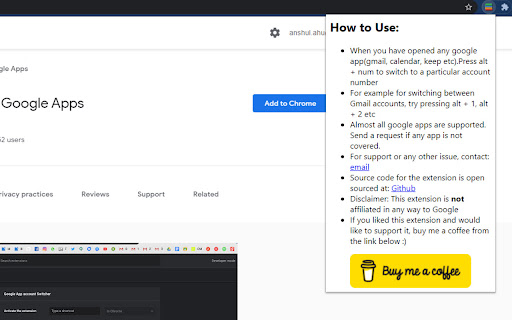
Use Alt + <num> key to switch between google accounts for various google apps like Gmail, Play music, Google Drive etc
This extension is for people using multiple Google accounts in their browser. It often becomes a hassle switching between the different accounts for various Google apps like Gmail, Google Docs, Google Play Music, Google Drive, Classroom, Meet etc. This extension gives you the ability to switch across users seamlessly using keyboard shortcuts in Chrome.
If this extension helped you out, support me by Buying me a coffee @ https://www.buymeacoffee.com/anshulahuja
So the extension makes use of that numbering.
To switch to say account number 2, you have to press Alt + 2 once you have already opened any of the supported google apps mentioned above.
Say you have gmail account 0 open, you can press Alt+2 to open the gmail account associated with account 2
Open sourced: https://github.com/anshulahuja98/account-switcher
Disclaimer: This extension is NOT affiliated to or endorsed by Google in any form.
| 分类 | ♿无障碍访问 |
| 插件标识 | gkdjdghoaaooagapfhmjgnagiigocjob |
| 平台 | Chrome |
| 评分 |
☆☆☆☆☆
|
| 评分人数 | |
| 插件主页 | https://chromewebstore.google.com/detail/account-switcher-for-goog/gkdjdghoaaooagapfhmjgnagiigocjob |
| 版本号 | 1.7.0 |
| 大小 | 14.83KiB |
| 官网下载次数 | 393 |
| 下载地址 | |
| 更新时间 | 2022-09-20 00:00:00 |
CRX扩展文件安装方法
第1步: 打开Chrome浏览器的扩展程序
第2步:
在地址栏输入: chrome://extensions/
第3步: 开启右上角的【开发者模式】
第4步: 重启Chrome浏览器 (重要操作)
第5步: 重新打开扩展程序管理界面
第6步: 将下载的crx文件直接拖入页面完成安装
注意:请确保使用最新版本的Chrome浏览器