
Opener Detector Chrome 插件, crx 扩展下载
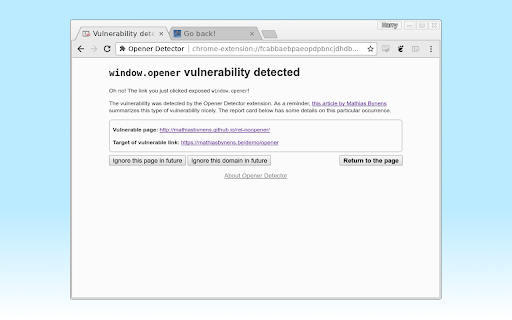
Checks for window.opener vulnerabilities as you browse.
A simple browser extension which checks for window.opener vulnerabilities as you browse. When it finds one, it shows a warning page in the vulnerable tab, so that you can report or fix the vulnerability. (Use the back button to return to the page.) Individual pages and whole domains can be added to an ignore list, and by default, vulnerabilities between pages of the same origin (e.g. https://example.com/foo.html and https://example.com/bar.html) are not reported, though this can be changed in the settings.
window.opener vulnerabilities allow Web pages to control the tab which opened them. They can be fixed on many browsers simply by adding rel=noopener to your links. For more details, check out Mathias Bynens' article (https://mathiasbynens.github.io/rel-noopener/).
Please use responsibly. Disclose vulnerabilities you find, or fix them. Keep your hat white.
Source code is available on GitHub (https://github.com/HarryCutts/opener-detector), under the 3-clause BSD license. Contributions welcome!
| 分类 | 💻开发者工具 |
| 插件标识 | glgmjdmfggnngmedfgccfdbhdjlfafin |
| 平台 | Chrome |
| 评分 |
☆☆☆☆☆
|
| 评分人数 | |
| 插件主页 | https://chromewebstore.google.com/detail/opener-detector/glgmjdmfggnngmedfgccfdbhdjlfafin |
| 版本号 | 8.3 |
| 大小 | 29.94KiB |
| 官网下载次数 | 63 |
| 下载地址 | |
| 更新时间 | 2017-09-04 00:00:00 |
CRX扩展文件安装方法
第1步: 打开Chrome浏览器的扩展程序
第2步:
在地址栏输入: chrome://extensions/
第3步: 开启右上角的【开发者模式】
第4步: 重启Chrome浏览器 (重要操作)
第5步: 重新打开扩展程序管理界面
第6步: 将下载的crx文件直接拖入页面完成安装
注意:请确保使用最新版本的Chrome浏览器